
Guide
Chess.com cheats on mobile: what works on iPhone and Android
Search for "Chess.com cheats mobile" and you get a wall of APK links, screen readers and apps nobody can vouch for. This guide sorts out what really exists for phones in 2026: what runs on an iPhone today, where Android stands, and what to leave alone.
The short answer
You can get engine help on a phone, but there is much less choice than the search results suggest. Next-move websites work on any phone and are too slow for a real game. Most APKs and screen readers come from sources you cannot check. A tool that draws on the board while you play takes real work on each platform, so few exist.
Chesscheats runs on iPhone and iPad today. The Android version is still in development, and there is no official APK yet.
What people mean by a mobile chess cheat
Four very different things show up under the same search:
| Kind | How it works | In a live game | Main problem |
|---|---|---|---|
| Next-move website | You set up the position in your phone's browser | Too slow | You leave the game on every move |
| Screen-reading app | A second app reads the board from your screen | Varies | Wants broad permissions, quality unknown |
| Modified APK | A changed copy of a chess app from a file site | Varies | You cannot tell what else was changed |
| In-game app | Arrows appear on the board you are playing on | Fast | Few exist, and they usually cost money |
These are the phone versions of the tools in our complete guide to chess cheats for Chess.com, which covers the desktop side as well.
Why a phone is harder than a PC
On a PC, a tool can sit in a window next to your browser. A phone shows one app at a time, so anything that lives in a separate app or tab costs you clock time on every move. In blitz and bullet that rules out most of the simple options.
Then there is installing it. The App Store and the Play Store do not list tools like this, so every real option goes on the phone by hand. On an iPhone that means sideloading. On Android it means a file from outside the Play Store, and that is where most of the bad downloads live.
What Chesscheats does on iPhone
You play on Chess.com as usual and the help appears on the board itself. There is no second screen and no copying positions.
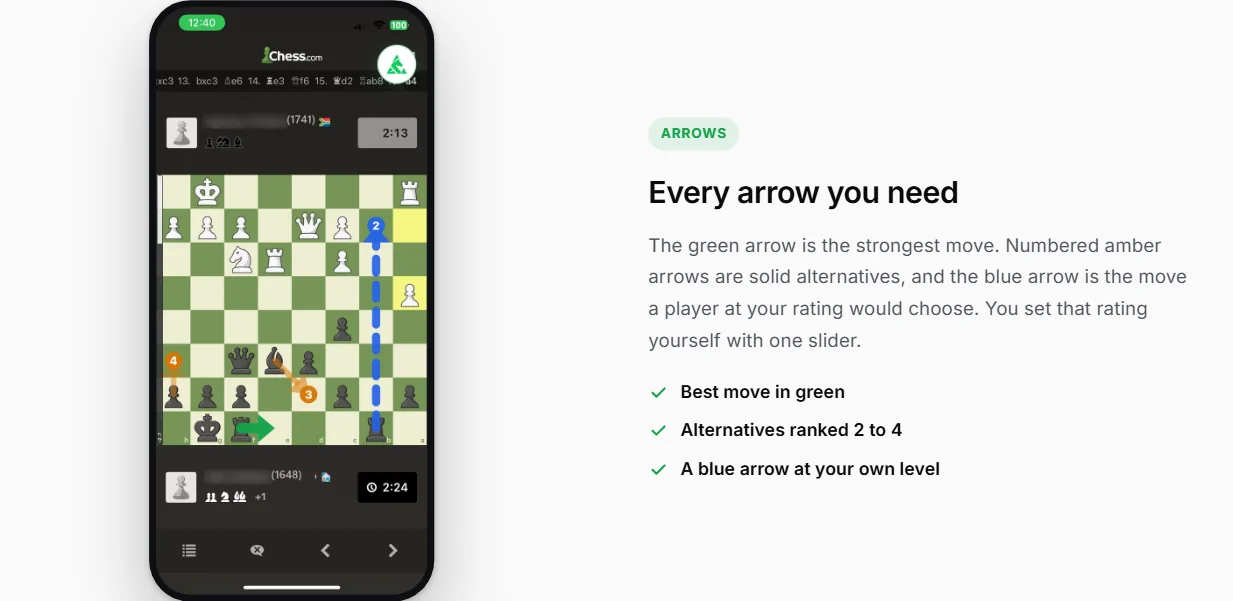
- A green arrow for the strongest move, and numbered amber arrows for the next best options.
- A blue arrow for the move a player of your level would choose. You set that rating with one slider.
- Hint mode keeps the board clean until you tap Hint, then shows a single move.
- Tactic flash lights up the key squares when one move clearly wins. A red arrow shows what your opponent is aiming at.
- Mate alerts and an evaluation bar, so you see a forced mate coming, on either side.
- Auto-play, if you would rather have the app play the moves at the strength you set.
- Puzzles inside the app, with a daily streak.
Every feature has its own switch, and you can change them in the middle of a game. You can run all the arrows, or leave only Hint on and use it when you are stuck.
How to install it on iPhone
You need iOS 15 or newer, a Chesscheats key and Developer Mode turned on. You do not need a jailbreak. The app also runs on iPad.

Step two is the only one that takes any thought, because you have to pick a sideloader. Sideloadly is the easiest, so start there:
| Method | Computer needed | Cost | Good to know |
|---|---|---|---|
| Sideloadly | Windows PC or Mac, with a cable | Free with an Apple ID | A free Apple ID signs an app for seven days |
| SideStore | Once, for the first setup | Free | Renews the app by itself over your network |
| ESign or Signulous | None | Yearly fee | Apple can revoke it |
With a paid Apple developer account, an install lasts a year. Only use the .ipa from your own dashboard. A copy that another site has re-signed is not a build we can vouch for. The steps are on our iPhone page.
Android and APK files
The Android version of Chesscheats is not out yet. When it is ready you will download the .apk from your dashboard and install it from the file. Android will warn you about an app from outside the Play Store, which it does for any app installed that way.
Until then, any site offering a Chesscheats APK is not us. "Chess cheat APK" is a popular search, and a lot of what it turns up deserves suspicion. Before you install one:
- Look at what it asks for. Accessibility access lets an app read and control what is on your screen. A chess tool that also wants your contacts or messages has no reason to.
- Be careful with modified copies of chess apps. You would be logging in with your real account inside a build someone else has altered.
- Do not reuse your password. If you try one anyway, use a throwaway account and a password you use nowhere else.
We go through the wider costs of free tools in free chess cheats: what they actually cost you.
Phone or PC
| Windows app | iPhone and iPad | Android | |
|---|---|---|---|
| Available today | Yes | Yes | Not yet |
| Live arrows | Yes | Yes | Planned |
| Auto-play | Yes | Yes | Planned |
| How you install it | Download from your dashboard | Sideloader | File from your dashboard, once it is out |
You do not have to choose. One key covers one PC and one phone at the same time, and the iPhone app is not a separate subscription. If you mainly want to see the best move while you play, our guide to the Chess.com overlay and move assistant explains what to look for.
The part about risk
Using engine help in rated games breaks Chess.com's Terms of Service, on a phone exactly as on a PC. A phone is not a hiding place. Chess.com's fair play system judges the games an account produces, and according to Chess.com it closed around 314,000 accounts in the first three months of 2025.
No tool can promise that an account will never be closed, and one that does is not being straight with you. Never use any assistance in an event that requires Proctor. More in how Chess.com detects cheating and is Chesscheats safe.
Questions people ask
Is there a Chess.com cheat for iPhone?
Yes. The Chesscheats app runs on iPhone and iPad with iOS 15 or newer and shows live arrows on the Chess.com board.
Is there a Chess.com cheat APK for Android?
Not from us yet. The Android version is in development. Be careful with APKs from other sources, because you cannot check what is in them.
Do I need a jailbreak?
No. You install the app with a sideloader and turn on Developer Mode.
Can I install it without a computer?
Yes, with ESign or Signulous, which charge a yearly fee. SideStore needs a computer once, for the first setup.
Can Chess.com detect cheating on mobile?
Chess.com judges the games an account plays, and that works the same on any device. Playing on a phone does not lower the risk.
Is the phone app a separate subscription?
No. It comes with your plan and uses the key you already have.
Live arrows on the screen you play on
The iPhone app comes with your plan, from €10.00 a month. 7-day money-back guarantee.
See the iPhone app