
Guide
Chess.com overlay and move assistant: the best move, live on your board
A move assistant is the quietest way to play stronger on Chess.com. An overlay draws the engine's answer on the board you are already playing on: the best move, and the moves that would throw the game away. You keep making every move yourself. This guide covers how it works, how it compares with extensions and calculators, and what a good one needs.
What an overlay and move assistant do
The two words describe the same tool from two sides. A move assistant is what it does: it watches the game you are playing and works out the strongest move every time the position changes. An overlay is how you see it: as arrows drawn over your own Chess.com board, right where you are already looking.
The hint is there the moment it is your turn. You decide what to do with it: play it, play your own idea, or just use it to check that you are not about to hang a piece. Nothing is played for you.
Why blunder warnings matter most
Most games below master level are not won by brilliant moves. They are lost by blunders. That makes the warning more useful than the suggestion: knowing which of your candidate moves drops material is often worth more than knowing the single best one, because it stops the mistake you were actually about to make.
That is why a good move assistant shows more than one arrow. Chesscheats shows the best move and the blunders, and a live accuracy meter tells you how the game is going from your side.
Overlay vs extension vs next-move calculator
Three kinds of tools put engine moves in front of you, out of the wider range in our guide to chess cheats for Chess.com. They feel very different in a real game:
| Next-move calculator | Browser extension | Desktop overlay | |
|---|---|---|---|
| Where it runs | A separate website | Inside your browser, in the game page | Its own app next to your browser |
| Getting the position in | You copy it every move | Automatic | Automatic |
| Where you see the move | In another tab | On the page | On your board |
| Fast enough for bullet | No | Usually | Yes |
| Shows blunders too | No, top move only | Rarely | Yes, in Chesscheats |
| Typical cost | Free, with ads | Free to cheap | Paid |
A calculator is fine for checking a position after a game, but switching tabs every move costs a lot of clock time. A free chess cheat extension is convenient, but most show nothing more than the top engine move, and many are built once and never updated. Whichever you use, remember that Chess.com judges the games, not the tool: an overlay only helps you if the moves you end up playing still look like yours. More on that in how Chess.com detects cheating.
Overlay vs auto-play bot
A chess bot plays the moves for you. An overlay does not touch the board: every move you make is yours. That makes it the right choice if you enjoy playing and want to play better, rather than collect wins without being there. Chesscheats includes both. The bot side is covered in the best chess bot for Chess.com.
What makes a good overlay
It keeps up with the clock
An arrow that shows up two seconds late is no use in a one-minute game. A good overlay updates the moment the position changes, in every time control.
It shows more than one move
The best move, the blunders and how the game is going. The top move on its own is the least useful hint.
It leaves the decision to you
You can take the suggestion, play your own idea, or ignore it in a position you know well. The point is that you are still the one playing.
It is maintained
Chess.com updates its site regularly. An overlay nobody maintains stops lining up with the board, or stops working altogether.
What you get in Chesscheats
- Live best-move arrows on the board you are playing on, updated every move.
- Blunder arrows that warn you which moves would throw the position away.
- A real-time accuracy meter, so you can see how the game is going from your side.
- Every time control. The arrows keep up in bullet and blitz, not only in slow games.
- An auto-play bot in the same app, for the games you do not want to play yourself.
All of this is in every plan, including Starter at €10.00 a month. A lot of our customers use Chesscheats mainly for the overlay. Two of the vouches posted in our Discord, shortened where you see the dots:
"I predominantly use the overlay for chess. Holds its own even in 2k! Really simple to use and set up ..." · Aqo, Lifetime
"... the overlay is amazing, great functionality, the overall work was done beautifully ..." · rand0m, Pro
You can read all of them on our reviews page.
What you need to run it
Chesscheats runs on Windows 10 and 11. For one board, 8 GB of RAM and a 4-core CPU is enough. If you also want to run several auto-play bots at once you need more, because each account gets its own browser window:
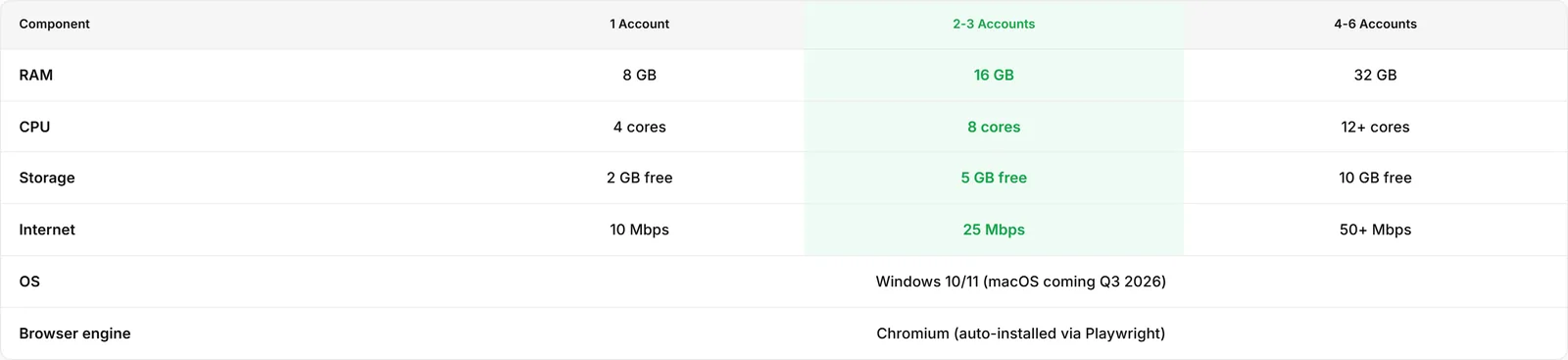
A Mac version is in development. The full setup, from key to first game, is in how Chesscheats works.
On your phone
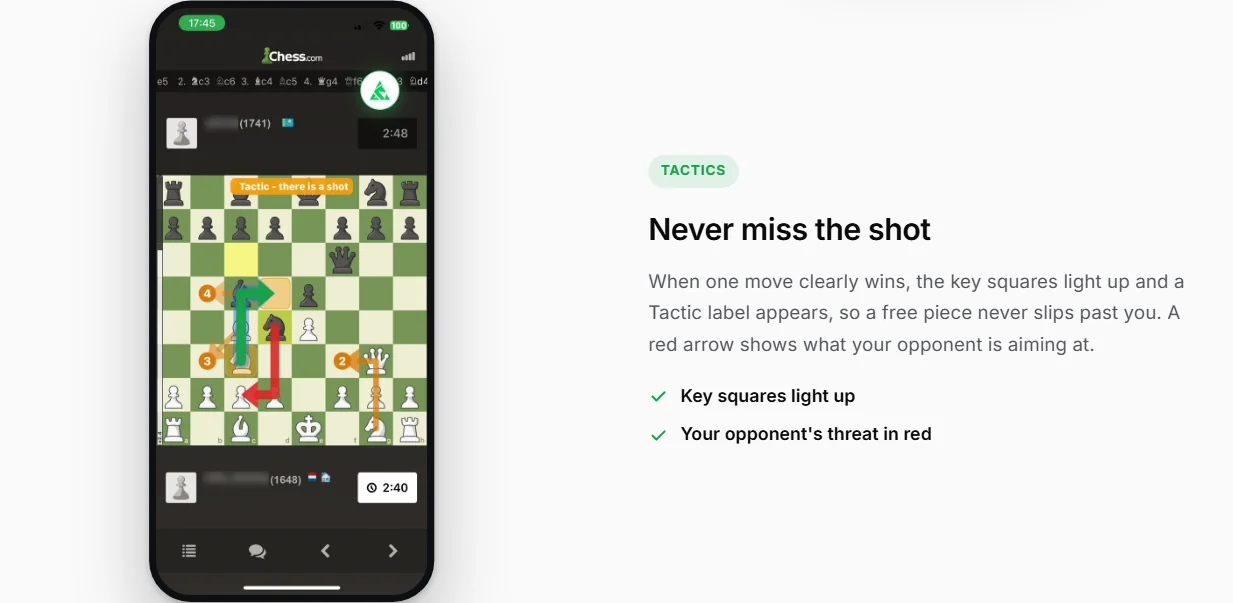
A lot of Chess.com games are played on a phone, so the arrows are there too. The app runs on iPhone and iPad today and comes with your plan. Android is still in development. How to install it, and what else exists for phones, is in Chess.com cheats on mobile.
Who it suits
- Players who want to keep playing themselves and stay in charge of every move.
- Players climbing in faster time controls, where a calculator is far too slow.
- Players who want to learn from seeing the strongest move in their own positions, as they happen.
One honest note: using engine help in rated games breaks Chess.com's Terms of Service, whether the move comes from an arrow or a bot. Use it with your eyes open, and never in proctored prize events.
Questions people ask
Does the overlay play moves for me?
No. In arrow mode you make every move yourself. If you want moves played for you, switch to the auto-play bot.
Is a chess overlay the same as a chess cheat extension?
They show similar things, but an extension runs inside your browser and an overlay like ours is a separate desktop app. The bigger difference is usually quality: what it shows, how fast, and whether anyone keeps it working.
Does it work in bullet?
Yes. The arrows update every move, fast enough for bullet and blitz.
Can I use it on my phone?
Yes, on iPhone and iPad, and on Android.
See the best move on your own board
Live arrows and the accuracy meter come with every plan, from €10.00 a month. 7-day money-back guarantee.
View plans