
Marvin
Lifetime
"This tool works really good for me and the updates are amazing. Keep up the good work!"
Vouched in our Discord

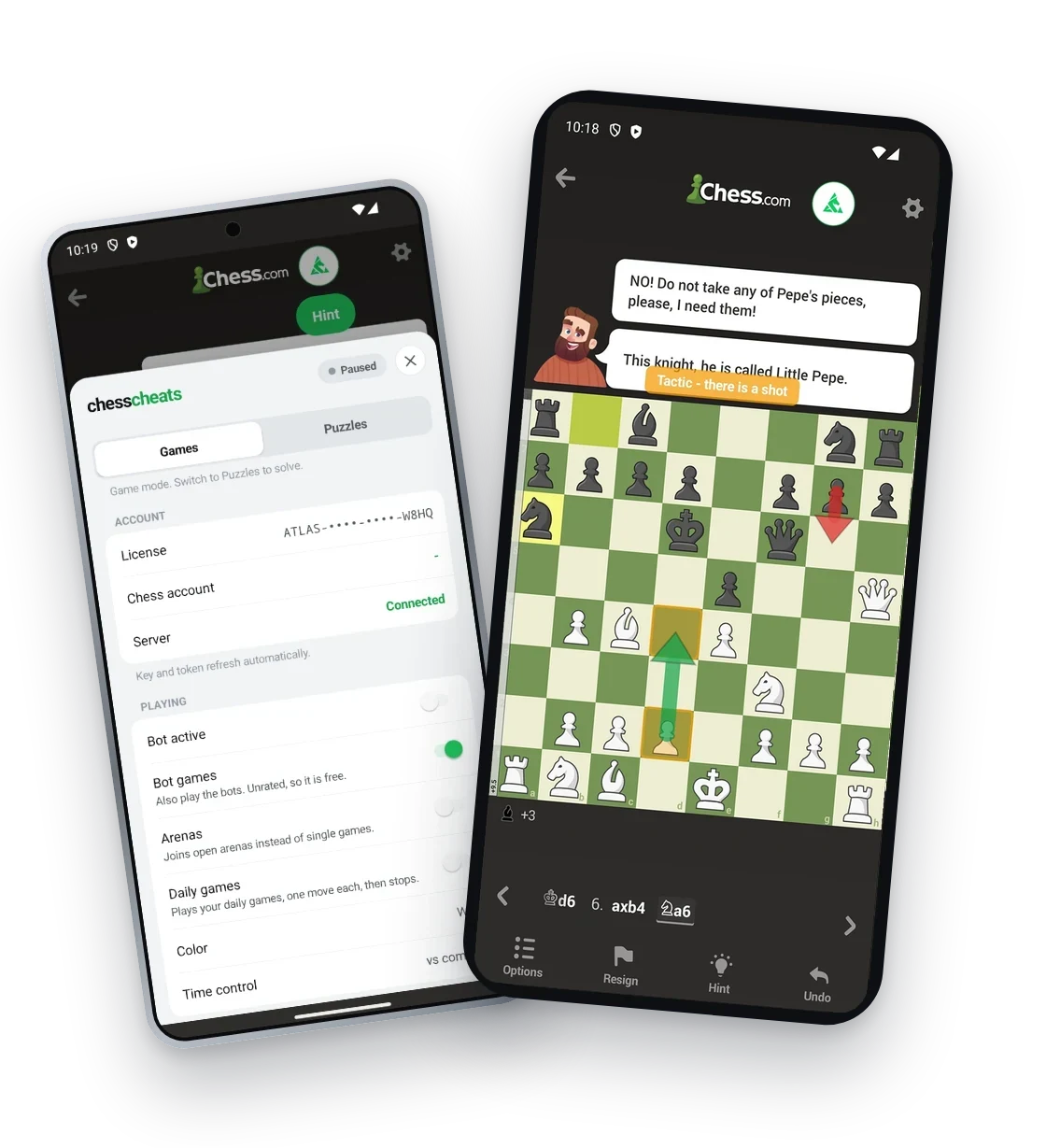
Everything you know from the desktop version, on the screen you actually play on.
iPhone and Android are live. Get the .ipa or the .apk from your dashboard.
Every plan plays like a real player: its own timing, its own mistakes. The difference is how many boards run at once. 7-day money-back on all three.



From download to your first game in a few minutes.
#strategy + #ban-recovery.#bot-status + #release-notes the moment chess.com tightens detection.#feature-requests.Real vouches from our Discord, posted by real customers
"This tool works really good for me and the updates are amazing. Keep up the good work!"

"I can confidently say that this is one of a kind on the market, the overlay is amazing, great functionality, the overall work was done beautifully, the owner clearly put his soul into this project. 10/10"

"I predominantly use the overlay for chess. Holds its own even in 2k! Really simple to use and set up, devs are happy to take and actively encourage constructive criticism. They show an actual interest and care in their work with continuous improvement. If you can, buy lifetime. 10/10"

"I've been using this cheat for over a month on two different accounts, both maintaining a rating of around 2000 Elo. I haven't been banned once, even though my gameplay is far from legitimate. As of now, this is the best cheat available - the most advanced, user-friendly, and discreet option out there. Whenever an issue arises, the support team is always ready to help and promptly resolves any bugs. I'm completely satisfied with it. Not only does it outperform all its competitors, but it's also cheaper. I can recommend it with confidence!"
"2nd vouch after some time. Over 550 games later. 2400 elo. 90% overlay use. 100% without a doubt the best chair. Many updates and improvements."

"Have been using ChessCheats since right when Atlas 3.0 was released and has been a great experience. Fast, easy to use and overall great. Dev is always fine-tuning, fixing any reported bugs and everytime I've had to ask from help from support, they've been nothing but extremely helpful. Can't recommend this enough."

"Used to be straight ass at this game. But bc of this bot I'm goated fr rn. Can't recommend Atlas enough & developer always helps whenever necessary."

"Got myself lifetime for both services, great decision if you ask me"
Ratings from Atlas bots, per game mode
Counted from the start of the day at 00:00 UTC. Updated every 10 minutes.
Real games played by Atlas bots, shared by their owners. Click any card to step through the moves.
Chess.com allows entire families to share a single internet connection - so why does Atlas insist on a dedicated residential proxy per bot? The difference isn't the IP, it's what chess.com looks at once multiple accounts share one.
Your games run on your own PC. Atlas talks to one server, ours: it checks your licence key when it starts and sends an error report if something breaks. The bot plays like a person, with variable timing, mouse movement and accuracy.
Atlas runs on Windows 10/11, and there is an app for iPhone and iPad. A macOS version is in development.
Overlay shows you the best move on one board, so you keep playing every move yourself. Pro plays for you on up to four boards at once. Lifetime is Pro with six bots, paid once instead of every month.
Yes. Cancel with one click - no minimum commitment. You keep access until the end of your billing period.
Atlas uses log-normal timing distributions, drag & click move mixing, context-aware think times, and natural accuracy variation. It resigns in lost positions and even chats during games.
Yes - all plans include automatic updates. We improve the engine, anti-detection and features continuously based on user feedback.
Chesscheats is an AI-powered chess assistant for Chess.com. It analyses the live board and shows the strongest move in real time, while built-in anti-ban protection keeps your play looking human. Whether you are searching for chess cheats, a chess bot, or a next-move calculator, Chesscheats is built to give serious Chess.com players a reliable edge in every game.
The Chesscheats desktop app runs on your own Windows PC and works alongside your browser, so you stay in control of every move. Plans start at €10.00 with monthly and lifetime options. On a phone? Read our guide to Chess.com cheats on mobile.
Chesscheats is an undetectable AI chess assistant for Chess.com. It runs on your Windows PC, reads the live position, and suggests the best move in real time so you can play stronger in every game.
Chesscheats is built from the ground up to stay undetectable. It mimics human timing and move choice and includes anti-ban protection on every game, so your play looks natural on Chess.com.
Chesscheats works with Chess.com on Windows, iPhone and iPad, and Android. On Windows you download the desktop app and it assists you directly while you play in your browser. On iPhone and iPad you install the app with a sideloader. On Android you install one apk, no root and no computer needed.
Plans start at €10.00. You can choose a monthly plan or a one-time lifetime licence, and pay by card or crypto.
Pick a plan, create your account, and download the Chesscheats desktop app from your dashboard. Most players are in their first assisted game within minutes.
Every plan plays like a real player. You pick how many boards run at once.
After subscribing, sign in and go to your Dashboard to get your license key and download instructions.
| Feature | Starter | Pro | Lifetime |
|---|---|---|---|
| Price | €10.00/mo | €15.00/mo | €50.00 once |
| Bot profiles | 1 | 4 | 6 |
| Live engine arrows (5-tier) | |||
| Live accuracy meter | |||
| Marketplace access | - | ||
| Priority support | - | ||
| Early access | - | - | |
| Dedicated support | - | - |
Minimum specs needed to run Chesscheats smoothly, depending on how many accounts you run simultaneously.
| Component | 1 Account | 2-3 Accounts | 4-6 Accounts |
|---|---|---|---|
| RAM | 8 GB | 16 GB | 32 GB |
| CPU | 4 cores | 8 cores | 12+ cores |
| Storage | 2 GB free | 5 GB free | 10 GB free |
| Internet | 10 Mbps | 25 Mbps | 50+ Mbps |
| OS | Windows 10/11 (macOS coming Q3 2026) | ||
| Browser engine | Chromium (auto-installed via Playwright) | ||
Each account runs its own Chromium browser instance (~800 MB RAM) + chess engine (~200 MB RAM).
Running more accounts than your system can handle may cause browser crashes and game disconnections.
Six steps. Each one takes under a minute.
Every plan runs on your own chess.com account. Pro and Lifetime also get a dedicated proxy, set up for you.
A residential proxy is set up automatically after checkout. You sign in with your own chess.com account.
Full bot or live engine arrows, signed in with your existing account.
Windows installer, plan-gated. Your dashboard serves the build that matches your tier.
License key and installer on the same screen, right after sign-in.
First launch shows an activation dialog. Paste your key, hit Activate.
Generated the moment Stripe confirms payment. Copy from the dashboard.
First activation binds the key to that machine. Prevents sharing.
machine_mismatch. Your licence holds one PC and one phone at the same time, so setting up the phone does not cost you your PC.
Pick the path that matches your plan.
Pre-configured to look human. Most users leave this alone.
Click the green START BOT. Atlas opens its own Chromium through your proxy and plays automatically.
Most setup questions land in Discord within minutes. For anything else, the contact form goes straight to the team.
Your bot plays on the same server as our own accounts, around the clock. Your PC can stay off. This is that server, live.
| Account | Bullet | Blitz | Rapid | Games today |
|---|---|---|---|---|
| Loading the live server | ||||
Plan-gated installer. Sign in and the Download button serves the build that matches your subscription.
Pick a plan and we'll generate your license key + unlock the matching builds below.
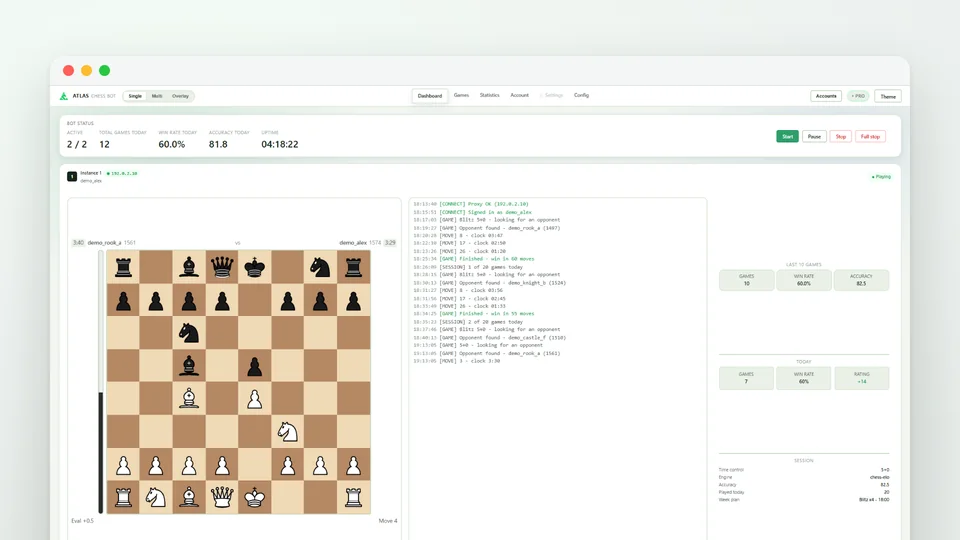
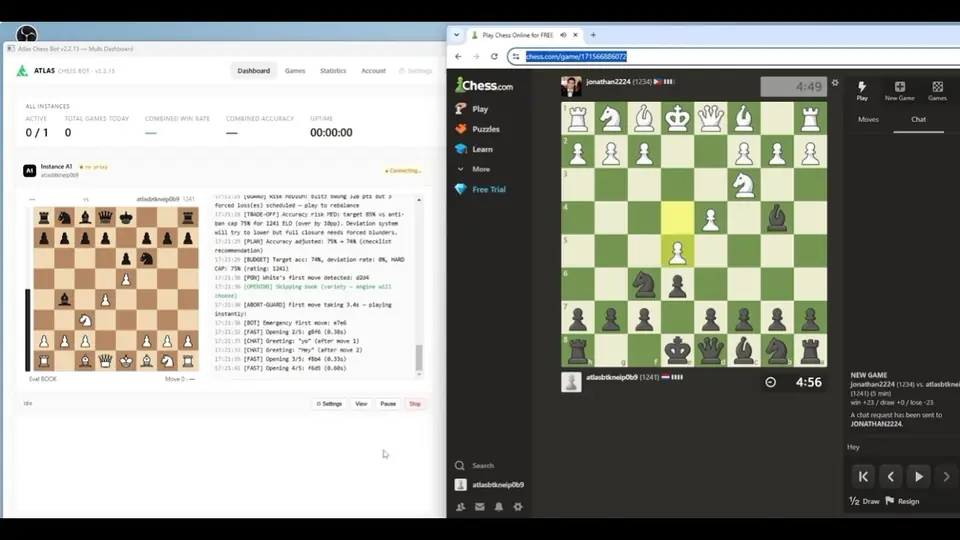
Full automation client. Humanizer, win-rate cap, 8 bot profiles, opening book, mode rotation, ban-risk monitor.
certutil -hashfile Atlas.exe SHA256: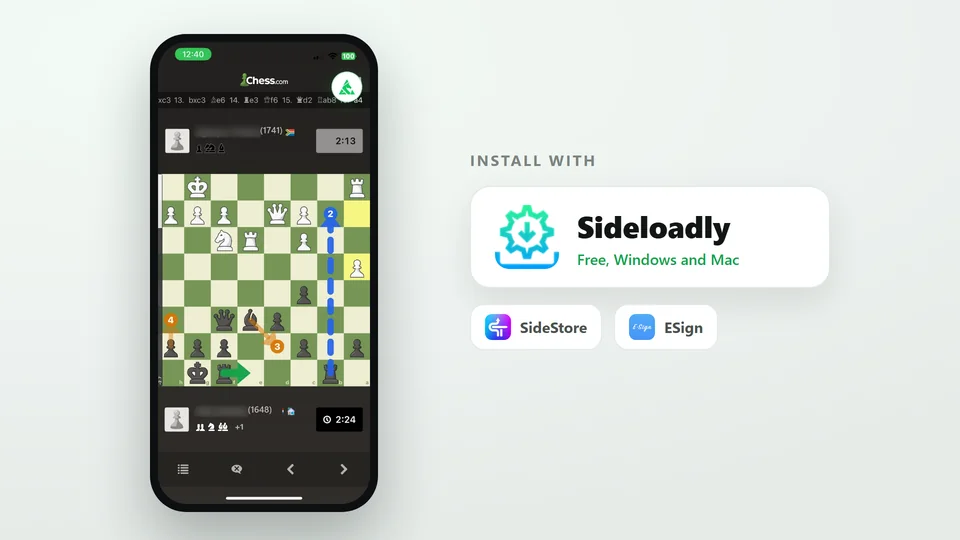
The coach on the screen you actually play on. Arrows, hint, tactics and mate alerts on the board, and every feature is a switch.
Install steps: iPhone guide. Comes with Pro and Lifetime. Runs next to the desktop build: one key covers one PC and one phone.
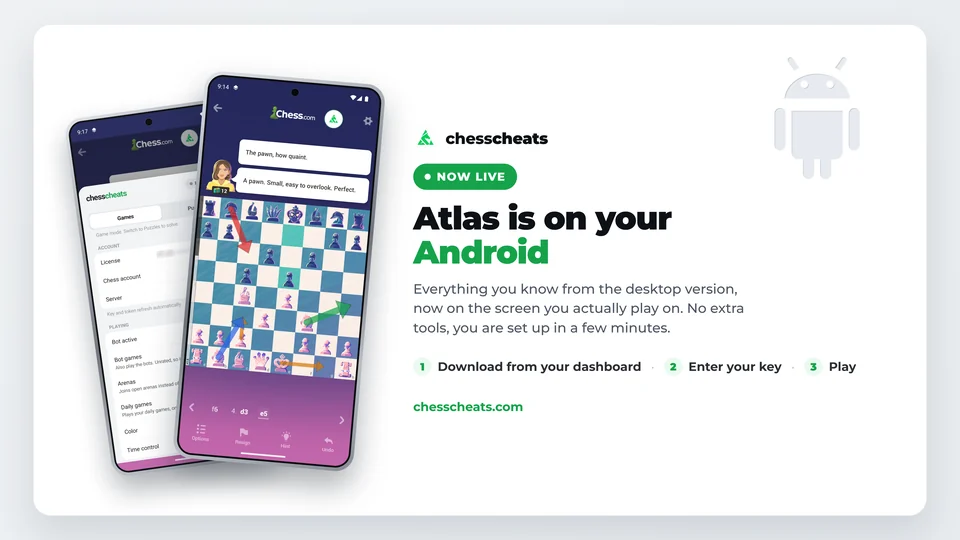
The same coach on your phone. Arrows, hint, tactics and mate alerts on the board, and every feature is a switch.
Install steps: Android guide. Comes with Pro and Lifetime. Runs next to the desktop build: one key covers one PC and one phone.
Replaces the manual download. It checks your licence, fetches Atlas into your own app folder, verifies it against the signed release, and keeps it up to date on its own. After this, opening Atlas is the only thing you ever do. It also refuses to run a build below the minimum version, and it survives a dropped connection: an interrupted download is picked up instead of started over.
Double-click the .exe. Windows SmartScreen may warn - click More info, then Run anyway.
Paste ATLAS-XXXX-XXXX-XXXX in the License dialog. Locks to this PC.
Pro & Lifetime: account auto-provisioned. Starter: bring your own.
Discord support, license issues, refund requests - all handled in minutes.
No accounts in stock right now. We stopped listing accounts to focus on the software. Ask on Discord if you want to hear when they come back.
 Our G2G storefront
View all listings
We are not listing chess accounts at the moment. Our Starter, Pro and Lifetime plans are still available on G2G.
You pay on G2G, not to us directly. G2G holds the payment and only releases it to us after you confirm the delivery, and every order has G2G's 14-day cover.
The username and password, delivered instantly by G2G. The account has no confirmed email, so you set your own address at first login and then change the password.
We only list accounts that are in stock on G2G. Ask us on Discord what is coming next.
See how Atlas bots rank against each other. Every name is partly hidden, so nobody can tell whose account it is.
Every active Atlas account is listed. Usernames show only their first two letters, and ratings and game counts are rounded to the nearest 10, to keep every account private. Closed accounts and accounts offline for more than 30 days are left out. The data comes from chess.com.
Step through any chess game move by move. Paste a PGN, or open a shared replay link.
Straight from the #vouches channel in our Discord, names and plans included.
"I've been using this cheat for over a month on two different accounts, both maintaining a rating of around 2000 Elo. I haven't been banned once, even though my gameplay is far from legitimate. As of now, this is the best cheat available - the most advanced, user-friendly, and discreet option out there. Whenever an issue arises, the support team is always ready to help and promptly resolves any bugs. I'm completely satisfied with it. Not only does it outperform all its competitors, but it's also cheaper. I can recommend it with confidence!"
"2nd vouch after some time. Over 550 games later. 2400 elo. 90% overlay use. 100% without a doubt the best chair. Many updates and improvements."
"I predominantly use the overlay for chess. Holds its own even in 2k! Really simple to use and set up, devs are happy to take and actively encourage constructive criticism. They show an actual interest and care in their work with continuous improvement. If you can, buy lifetime. 10/10"
"Have been using ChessCheats since right when Atlas 3.0 was released and has been a great experience. Fast, easy to use and overall great. Dev is always fine-tuning, fixing any reported bugs and everytime I've had to ask from help from support, they've been nothing but extremely helpful. Can't recommend this enough."
"I can confidently say that this is one of a kind on the market, the overlay is amazing, great functionality, the overall work was done beautifully, the owner clearly put his soul into this project. 10/10"
"This tool works really good for me and the updates are amazing. Keep up the good work!"
"Got myself lifetime for both services, great decision if you ask me"
"Used to be straight ass at this game. But bc of this bot I'm goated fr rn. Can't recommend Atlas enough & developer always helps whenever necessary."

"Solid tool, no issues so far and helpful devs"
"bought the pro but will 100% get the lifetime. Works perfectly and its very customizable. Thanks!"

"Works amazingly 10/10"
Reviews come straight from our Discord. Post yours in the #vouches channel and it can end up on this page, with your name and plan.
Leave a vouch on DiscordChesscheats started as a side project and evolved into the most sophisticated automated chess assistant for Chess.com, the tool players reach for when they search for chess cheats that actually stay undetected.
Powered by Stockfish, one of the strongest chess engines ever created.
With proper settings, Atlas Chess achieves near-perfect results in rated play.
Atlas Chess is a desktop application that runs alongside Chess.com and uses Stockfish engine analysis to play optimal moves. It reads the board position in real time and calculates the best response within milliseconds.
The app supports both manual hint mode and a fully automated autopilot mode that plays entire games with human-like timing patterns.
We believe every player deserves access to powerful analysis tools. Atlas Chess is built and maintained by a small team of chess enthusiasts who care deeply about engine strength, anti-detection, and user experience. Every update is driven by community feedback.
Have a question, suggestion, or want to report an issue? We read every message.
Have a question, feedback, or a technical issue? Send us a message and we'll get back to you within one business day.
Fill in the form below and we'll respond as soon as possible.
Thanks for reaching out. We'll get back to you within one business day.
Real-time ratings and stats pulled directly from Chess.com.
Browse every conversation between the bot and its opponents during live games.
No games with chat found yet.
Chat messages are saved as soon as opponents type during a game.
Six providers, independently tested. Pick what fits your scale.
| Provider | Price / IP / mo | Min. buy | EU regions | Best for | |
|---|---|---|---|---|---|
|
IPRoyal
ISP - proven on chess.com, what we run
|
€1.80 | 1 IP | NL · DE · BE | Plug-and-play, already works out-of-box | Visit |
|
Proxy-Cheap
Static residential - NL specialist
|
$1.27 | 1 IP | NL · DE · BE | NL-focused setups, small fleets | Visit |
|
Bright Data Premium
ISP - best-in-class ASNs
|
$1.30 | 10 IPs | all EU | Scaling past 50 accounts | Visit |
|
Proxy-Seller US specialist
ISP - 50 US states + global cities
|
$1.00 | 1 IP | US · EU · AS | US chess.com accounts, geo-matched play | Visit |
|
advertised $1 tier is rotating-per-GB (insta-ban risk) · ISP-dedicated is ~$5 and has no NL IPs
|
~$5 | 1 IP | US only | - not for NL/EU chess.com accounts | Details |
|
$0.30 pool has burned IPs · dedicated tier not worth the price
|
$1.47 | 20 IPs | NL · DE | - skip this one | Details |
News, guides and updates from the Chesscheats team.
Updates, release notes and guides land here. Check back soon.
Chesscheats is a study and bot-practice tool. Use it against chess.com's bots and the trainer - not against real human players.
Chesscheats is built for play against chess.com's built-in bots (Komodo, Maia, Mittens, Hikaru-bot, etc.) and as a study aid for the Trainer, Lessons, Puzzles and game-review features. In those contexts engine assistance does not affect another human player - it is the same posture as any chess engine GUI (Arena, Cute Chess, Lichess Analysis).
The software is not intended for use against human opponents in rated or unrated games. Doing so violates the chess.com Fair Play Policy and falls outside the scope of any warranty, refund or liability offered by Chesscheats. If you choose to use the tool against humans, you accept full responsibility for the outcome - including bans, ELO loss, and any consequential damages.
Chesscheats is a desktop application that uses a local Stockfish engine to compute moves and, when authorised by the user, play them automatically on chess.com.
Designed for:
Not designed for:
The anti-ban features (humanizer, win-rate cap, mode rotation) exist to protect you in the rare case detection runs even on bot games - they are not an endorsement of human-play use.
Chesscheats is not: a magic shield that makes you invisible, a guarantee against detection, or a tool we recommend pointing at real opponents. The software is technically capable of playing any chess.com format - the software does not enforce its intended scope, and that is by design: it is up to you, the user, to do so.
By installing and activating Chesscheats you confirm that you will use it within its intended scope. Any decision to use it against human opponents is your decision alone, taken at your own risk. Chesscheats has no obligation, warranty or liability for outcomes arising from use outside that scope - including account bans, ELO loss, removed titles, lost premium subscriptions, withheld prizes, or reputational damage. Refund claims that arise from such use will be denied.
The chess.com Fair Play Policy prohibits:
Violations can lead to a permanent ban, loss of titles, and an IP-level block. Chess.com uses statistical analysis, behavioural fingerprinting, and move-time pattern recognition to detect engine use.
No bot developer can give an exact percentage - chess.com doesn't publish their detection statistics. What we can say from our own test data:
Chesscheats can't stop an opponent from reporting you, can't prevent chess.com from running a manual review, and can't protect you if you accidentally log in from the same IP as a previously banned account. It also can't compensate for user errors like playing 24/7, 500 games a week, or entering rated tournaments where extra detection layers run.
Chesscheats is provided "as is" without any warranty. By using Chesscheats you confirm that you have read this page, accept its risks, and agree to use the software within its intended scope (chess.com bots, the Trainer, Lessons, Puzzles, and personal analysis).
We are not liable for:
The 7-day money-back guarantee is voided in cases of confirmed misuse, and refund claims arising from use outside the intended scope (including bans during human play) will be denied. This is consistent with the EU 14-day digital-services waiver you accepted at checkout (Directive 2011/83/EU art. 16(m)).
Questions about this page? Get in touch - we'd rather give you an honest answer up front than after the fact.
Last updated: 29 April 2026 · Version 2.0
By creating an account, purchasing a plan, downloading the Software, or using any part of the Service you (the "Customer") accept these Terms in full. If you do not accept them, do not use the Service.
These Terms form a binding agreement between you and the Provider. Sections 5 (Acceptable Use), 7 (Indemnification), 8 (Disclaimer), 9 (Limitation of Liability), and 16 (Disputes) contain important limitations on your rights and our obligations. Read them carefully.
The Service consists of (i) downloadable Software for Windows, (ii) a license-management dashboard, (iii) optional residential-proxy provisioning, and (iv) optional disposable-email and chess.com account-creation tooling, depending on the Plan you have purchased. Provisioning of digital components begins within minutes after payment is confirmed.
The Service is intended for use as a chess study, practice and analysis tool against chess.com's built-in bot library and within the chess.com Trainer, Lessons and Puzzles features (the Intended Scope, Section 5). The Service is not designed, marketed, or sold for use against human opponents in ranked or unrated play.
You may only use the Service if you:
You are responsible for keeping your login credentials and license key confidential, and for any activity that occurs through your account.
Subject to your continued compliance with these Terms and full payment of any applicable Fees, the Provider grants you a limited, non-exclusive, non-transferable, non-sublicensable, revocable license to install and use the Software on a single device per license key, exclusively for your personal, non-commercial use within the Intended Scope.
The ATLAS bot is locked to a hardware identifier (HWID) on first activation. The optional BurnerMail browser extension uses an IP-address whitelist with a hard cap of three (3) distinct IPs per key, intended to cover personal use across locations such as home, school, and a spare device on the same account. You may reset both locks from the dashboard at any time; the Provider reserves the right to throttle or block resets that are used to circumvent the one-device-per-key restriction.
You may not, and may not permit any third party to:
The Service is licensed for use within the following Intended Scope:
Outside Scope. Use of the Software against human opponents in any chess.com format (rated, unrated, tournament, arena, or otherwise) is outside the Intended Scope. Where the Software is technically capable of such use, the Provider does not endorse it and does not represent that the Software is safe, lawful, or compliant with the chess.com Fair Play Policy in such contexts. Any decision to use the Software outside the Intended Scope is made solely by you, at your own risk, and on your own responsibility.
You agree, at all times, not to use the Service to:
The Responsible Use page (/responsible-use) is incorporated by reference into these Terms and forms part of the Acceptable Use Policy.
By using the Service, you represent and warrant that:
You agree to defend, indemnify and hold harmless the Provider, its successors, affiliates, owners, directors, employees, contractors and agents (collectively, the "Indemnified Parties") from and against any and all claims, demands, actions, proceedings, losses, damages, fines, penalties, judgments, settlements, costs and expenses (including reasonable attorneys' fees) (collectively, "Claims") arising out of or in any way connected with:
The Provider may, at its option, assume the exclusive defence and control of any matter for which you are required to indemnify, in which case you agree to cooperate at your expense.
To the maximum extent permitted by applicable law, the Service and the Software are provided "AS IS", "AS AVAILABLE", AND "WITH ALL FAULTS", without warranty of any kind, whether express, implied, statutory or otherwise. The Provider expressly disclaims all warranties, including without limitation warranties of merchantability, fitness for a particular purpose, title, non-infringement, accuracy, completeness, and uninterrupted operation.
Without limiting the foregoing, the Provider does not warrant that:
Some jurisdictions do not allow the disclaimer of certain warranties; in those jurisdictions the foregoing disclaimers apply only to the maximum extent permitted by such law.
To the maximum extent permitted by applicable law:
Mandatory law. Nothing in these Terms excludes or limits any liability that cannot be excluded or limited by applicable law, in particular liability for fraud, gross negligence, intentional misconduct, or death or personal injury caused by negligence.
Recurring subscriptions auto-renew at the end of each billing cycle until cancelled. You can cancel anytime in your dashboard or via the Stripe customer portal; cancellation takes effect at the end of the current billing period. We do not pro-rate refunds for partial periods, except where required by mandatory law.
You authorise the Provider (and our payment processors) to charge your selected payment method for all Fees due, including renewals, taxes and any applicable fees. Failed payments may result in suspension of the Service after a grace period.
Prices are in EUR and inclusive of VAT where applicable. The Provider may change prices for future billing periods on at least thirty (30) days' notice; you may cancel before the new price takes effect.
EU consumers normally have a fourteen (14) day right of withdrawal under Directive 2011/83/EU. For the Service this right is waived the moment performance begins (e.g. when your license key is issued, your proxy is provisioned, or your chess.com burner account is created), pursuant to art. 16(m) of that Directive (digital content supplied other than on a tangible medium, where performance has begun with the consumer's prior express consent and acknowledgment that they thereby lose their right of withdrawal). You give that consent at checkout via the Stripe consent checkbox.
Beyond the statutory waiver:
Lifetime plans that include a bundled IPRoyal residential proxy (for example the Lifetime Multi bundle, and legacy Lifetime purchases that shipped with a proxy) include that proxy for 12 months from purchase. After that period the proxy is no longer included; your software license remains valid indefinitely, but you bring your own proxy or pay IPRoyal directly (~€1.80/month). Software-only Lifetime plans do not include a proxy. This rule is reflected in the dashboard and you are notified 30 days before expiry.
The Provider may suspend or terminate your access to the Service, with or without notice, if you breach these Terms (including the Acceptable Use Policy), if any payment is overdue, if continued provision of the Service exposes the Provider to legal or operational risk, or as required by law.
You may terminate your subscription at any time as described in Section 10. Upon termination: (i) your license is revoked; (ii) you must stop using the Software and destroy all copies; (iii) Sections 5-9, 14, 16 and 17 survive termination.
The Provider is not liable for any failure or delay in performance caused by events beyond its reasonable control, including without limitation acts of God, natural disasters, war, terrorism, riots, civil unrest, governmental action, sanctions, changes in law or regulation, labour disputes, internet or telecommunications failures, denial-of-service attacks, third-party platform changes (including changes to chess.com's policies, anti-cheat systems or APIs), payment-processor actions, and infrastructure outages.
The Provider may amend these Terms from time to time. Material changes will be communicated by posting the updated Terms on chesscheats.com with a revised "Last updated" date and, where reasonably practicable, by email or dashboard notice at least thirty (30) days before they take effect. Your continued use of the Service after the effective date constitutes acceptance of the updated Terms. If you do not agree, you must stop using the Service before the effective date and may cancel your subscription.
These Terms and any dispute arising out of or in connection with them or the Service are governed by applicable law, excluding conflict-of-laws rules and excluding the United Nations Convention on Contracts for the International Sale of Goods.
Mandatory negotiation. Before initiating any formal dispute, the parties shall attempt to resolve any dispute amicably by contacting support and providing a written description of the dispute. The Provider will respond within thirty (30) days.
Arbitration. If amicable resolution is not reached within sixty (60) days, any dispute shall be finally resolved by binding arbitration in accordance with recognised arbitration rules. The language of the arbitration shall be English. The number of arbitrators shall be one. The decision of the arbitrator shall be final and binding.
Consumer rights. If you are an EU consumer and mandatory consumer-protection law of your country of residence grants you a right to bring proceedings in your home courts that cannot be excluded by these Terms, that right is preserved. Otherwise, you and the Provider waive any right to have a dispute heard by a national court (subject to the arbitration agreement above) and waive any right to participate in a class, collective, or representative action.
You may also use the EU Online Dispute Resolution platform: ec.europa.eu/consumers/odr.
For all support, refund-review, dispute and legal-notice purposes: contact form or support@chesscheats.com. We respond within 1-2 business days. Privacy-related requests: see the Privacy Policy.
Last updated: 28 July 2026 · Version 2.1
This Privacy Policy explains what personal data the Provider collects when you use chesscheats.com or the Software, why we collect it, how we use it, with whom we share it, and the rights you have under the EU General Data Protection Regulation (GDPR).
The Provider operating chesscheats.com is the data controller for the personal data described in this Policy. For privacy enquiries, exercise of your rights, or to lodge a concern, contact: privacy@chesscheats.com.
We are not legally required to appoint a Data Protection Officer (DPO) given our scale and processing activity, but the privacy contact above is the responsible point of contact for all data-protection matters.
We collect only what is necessary to operate the Service:
We do not collect special-category data (health, religion, biometric, political, etc.) and do not intentionally collect data from children under 18.
The ATLAS browser extension is a separate product from the desktop software and handles less data. It runs only on chess.com. While it is switched on and you are playing, it reads the current board from the page you already have open and sends the following to our own analysis server so it can return move suggestions:
The extension does not send your chess.com username, your name, your e-mail address, your password, your chess.com cookies or session, your browsing history, or anything from any other website. It stores only your own settings (licence key, on or off, which arrows to show, the chosen theme, today's free-game count) in your browser's local extension storage, and that stays on your device apart from the licence key. It contains no chess engine and executes no code downloaded from our servers: the reply is a list of moves as text.
Legal basis: performance of the contract (Art. 6(1)(b) GDPR) for the move suggestions and the licence check, and legitimate interest (Art. 6(1)(f)) for enforcing the free daily limit and preventing abuse. Retention follows Section 7; positions are processed to answer the request and are not kept against your identity. Removing the extension from Chrome deletes everything it stored on your device.
For each category of data we rely on one of the GDPR-recognised legal bases:
We use a small number of third-party processors who handle data only on our instructions, under written data-processing agreements where required by Art. 28 GDPR:
We do not sell personal data to anyone, ever.
Some of our processors are based in or process data in the United States or other countries outside the European Economic Area. Where we transfer personal data outside the EEA, we rely on the EU Standard Contractual Clauses (SCCs), the EU-US Data Privacy Framework (where the recipient is certified), or another lawful transfer mechanism under Chapter V GDPR.
Under the GDPR you have the right to:
To exercise any right, email privacy@chesscheats.com. We respond within thirty (30) days. We may ask you to verify your identity before acting on a request.
We use only the cookies strictly necessary to operate the Service: a Supabase session cookie (auth) and a small number of preference cookies (theme, last-visited page). We do not use third-party advertising, analytics, retargeting or social-media tracking cookies. No consent banner is shown because no non-essential cookies are set.
We apply industry-standard measures to protect your data: HTTPS-only transport, hashed passwords (managed by Supabase), encrypted database storage at rest, role-based access control, and minimal-privilege service keys. We will notify affected users and the supervisory authority within 72 hours of becoming aware of a personal-data breach where required under Art. 33-34 GDPR.
The Service is not intended for, and we do not knowingly collect data from, anyone under 18. If you believe a minor has provided us with personal data, contact us and we will delete it.
We may update this Privacy Policy from time to time to reflect changes in our practices or legal obligations. The "Last updated" date at the top reflects the most recent revision. Material changes will be notified via email or dashboard message at least thirty (30) days in advance.
Privacy contact: privacy@chesscheats.com. General support: contact form. Supervisory authority: your local data protection authority.
Generate a dedicated iCloud Hide My Email alias, a strong password, and a realistic username - a clean identity for every new chess.com account you run with Chesscheats, kept isolated from your real inbox.
chrome://extensions (or edge://extensions).extension/ folder.The generator and history are only available to users with an active Chesscheats plan. The extension download, setup video, and install instructions above remain freely accessible.
If you fill this in, Chesscheats Burner opens the signup page and the extension fills the form for you.
Runs a proxy-backed chess.com signup via your Atlas bot - never uses your home IP.
Accounts created through the Royal IP queue - each locked to a dedicated residential IP, never linked to your home connection.
One destination for everything you need: setup, account creation, and the list of accounts the bot can play on. We auto-detect what's done and show you exactly what to do next.
scripts\install_autostart.batyourname@icloud.com). If you already see an inbox, skip.
@icloud.com address from step 1.
xxxx-xxxx-xxxx-xxxx).
One-time setup. You'll generate an app-specific password at Apple (bypasses 2FA, mail-access only), then paste it in the form below - no files to edit. Next chess.com signup verifies itself.
If your Apple ID doesn't have an @icloud.com mailbox, or your Hide My Email aliases forward to Gmail/another provider, the bot can't read chess.com's verify mail. Fix once:
yourname@icloud.com). If you already see an inbox, skip.@icloud.com address.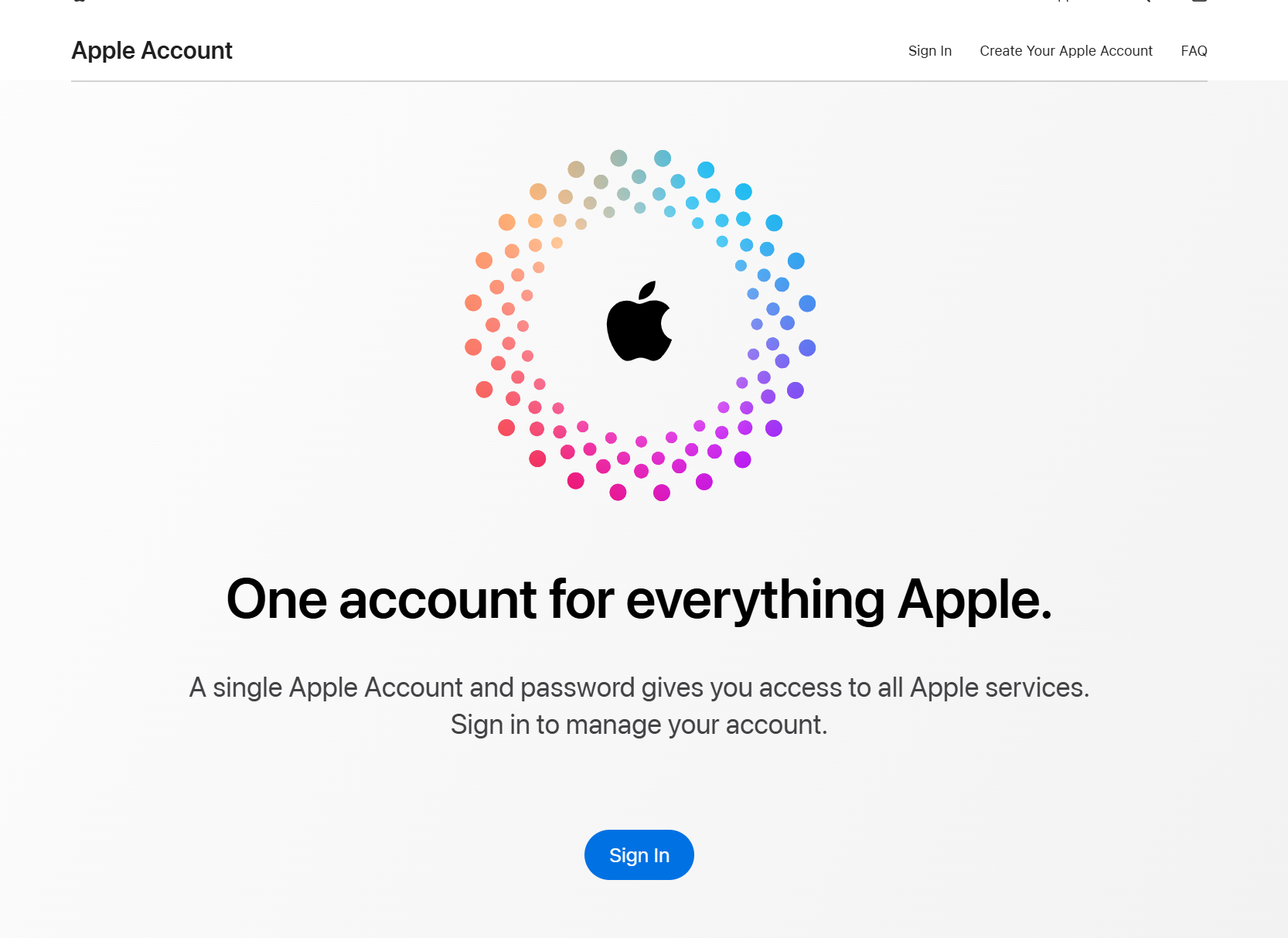
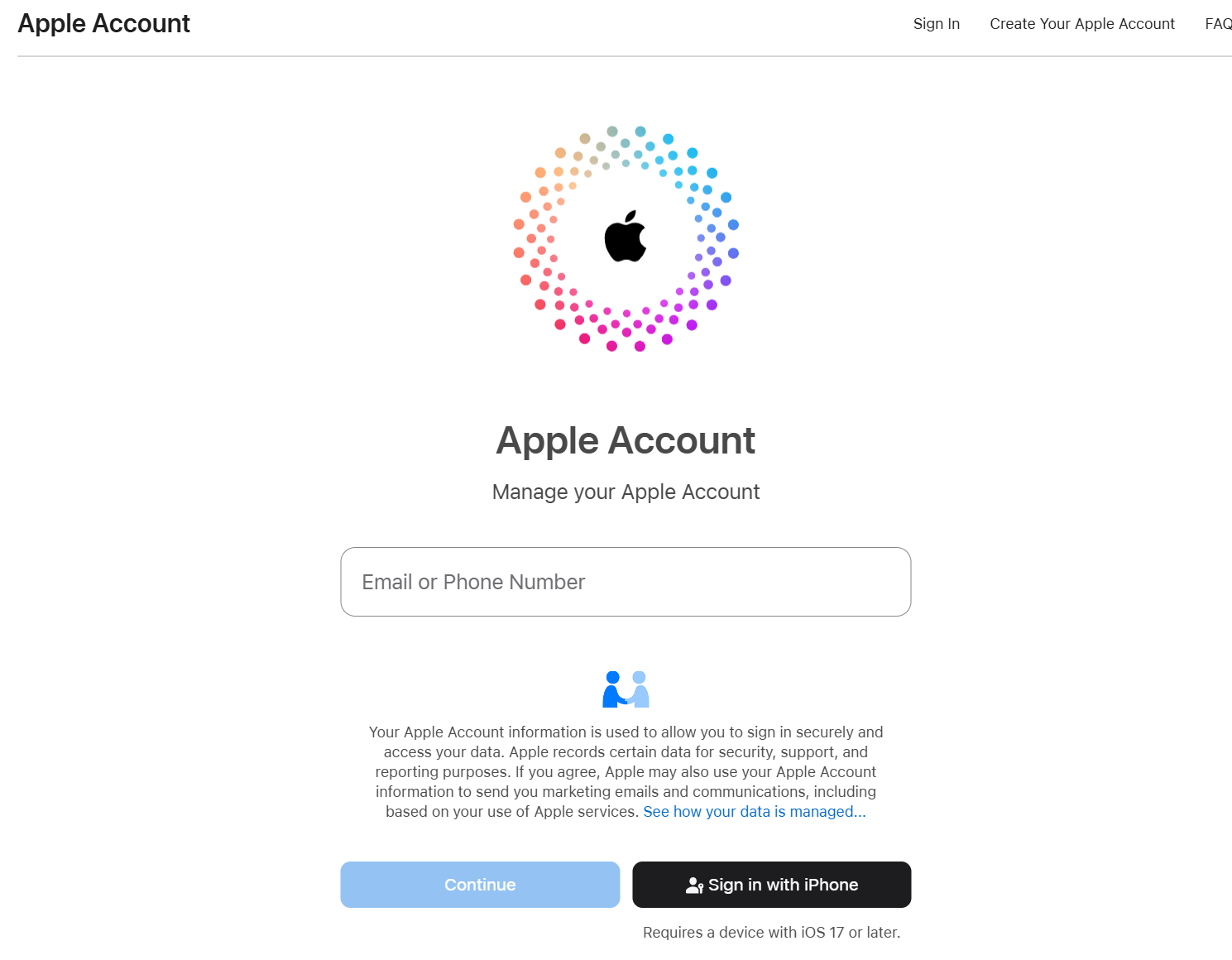
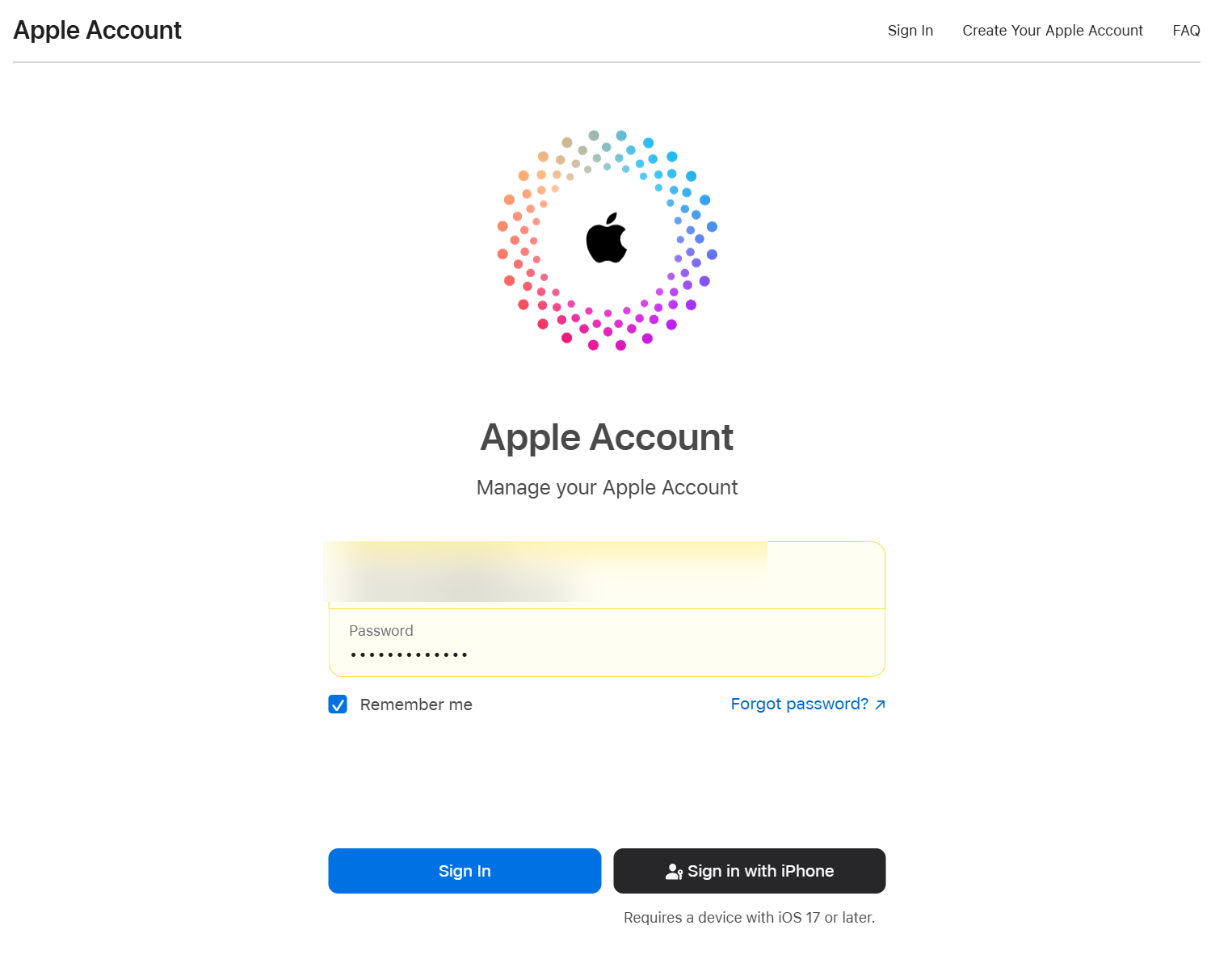
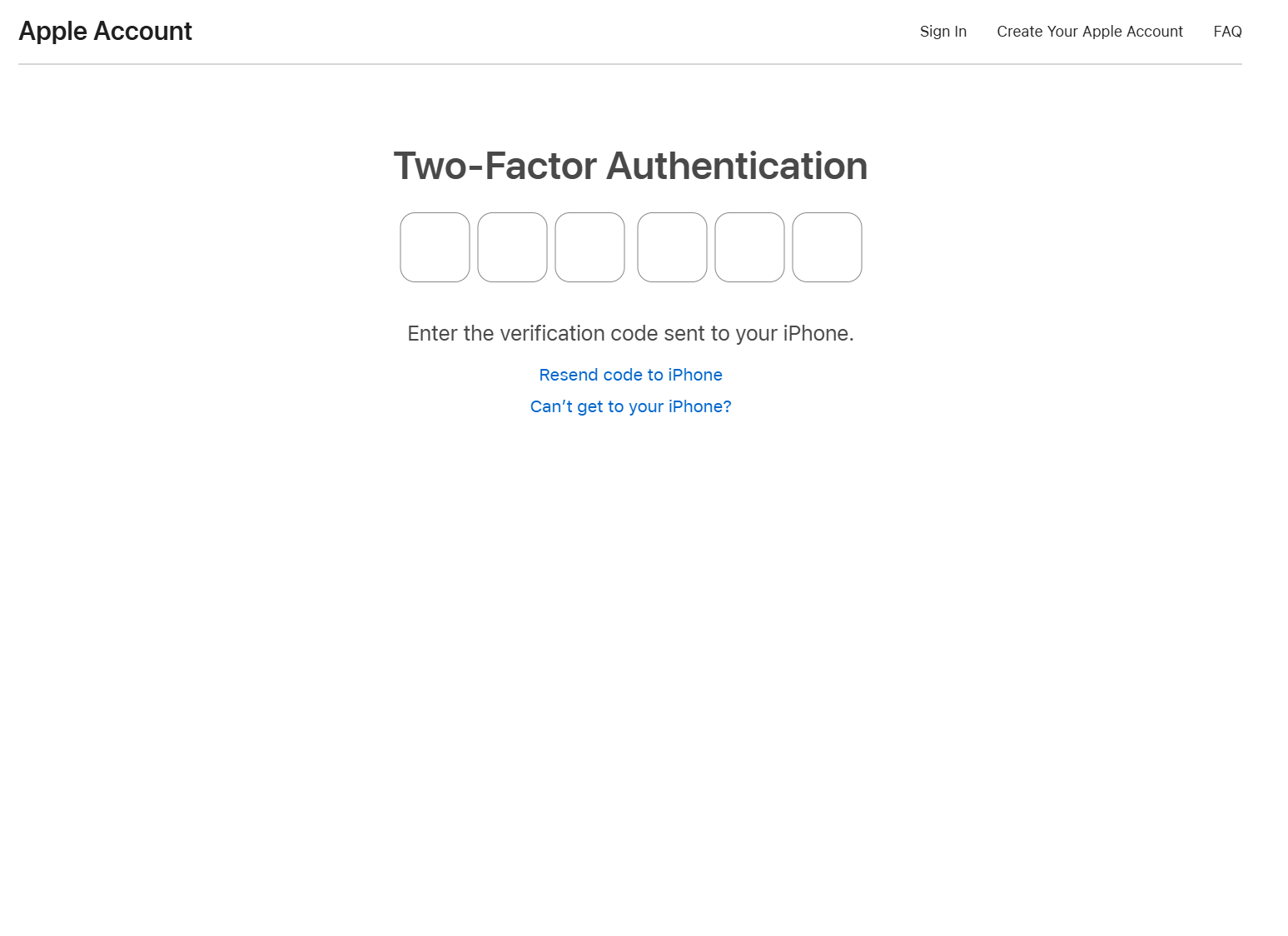
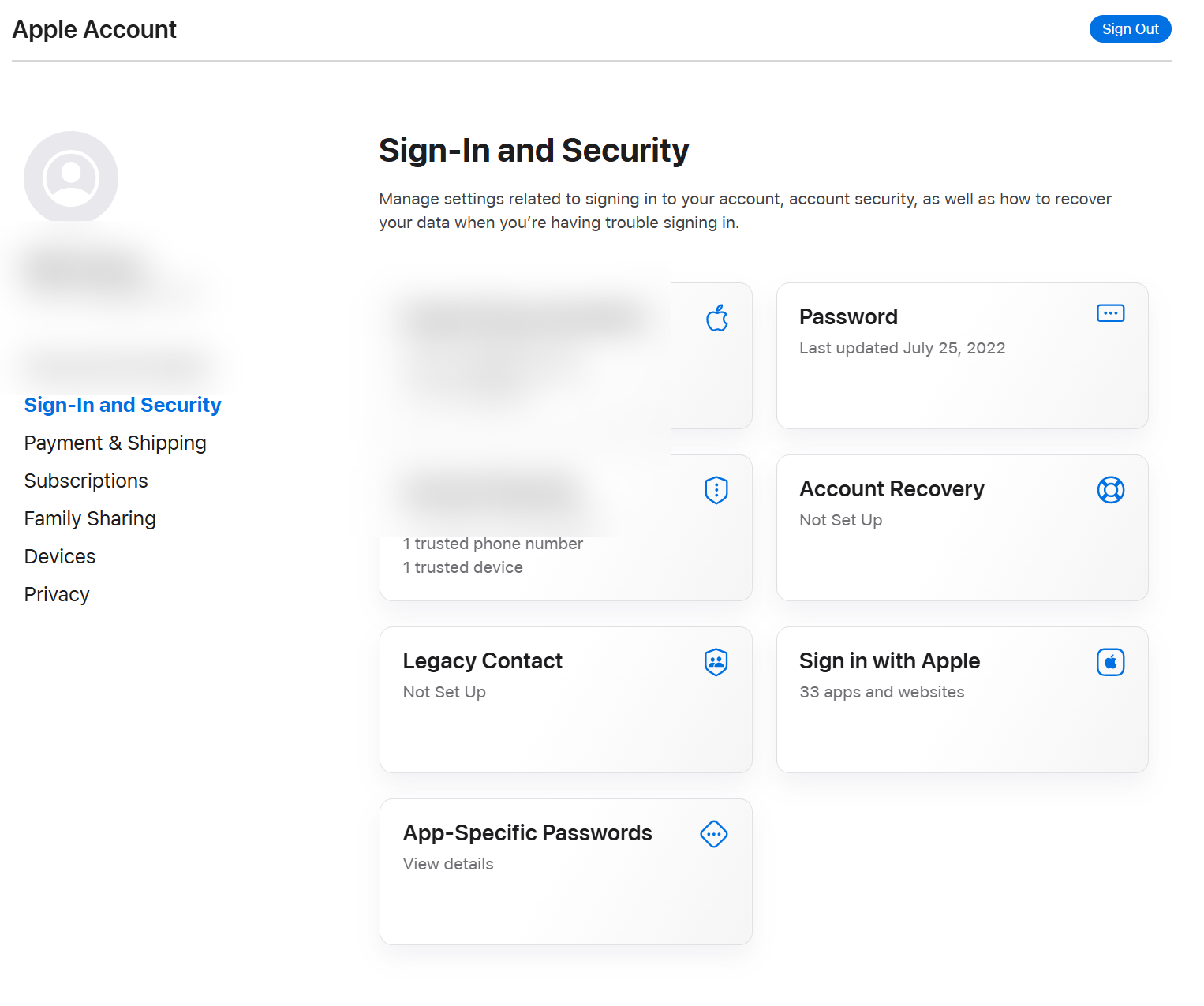
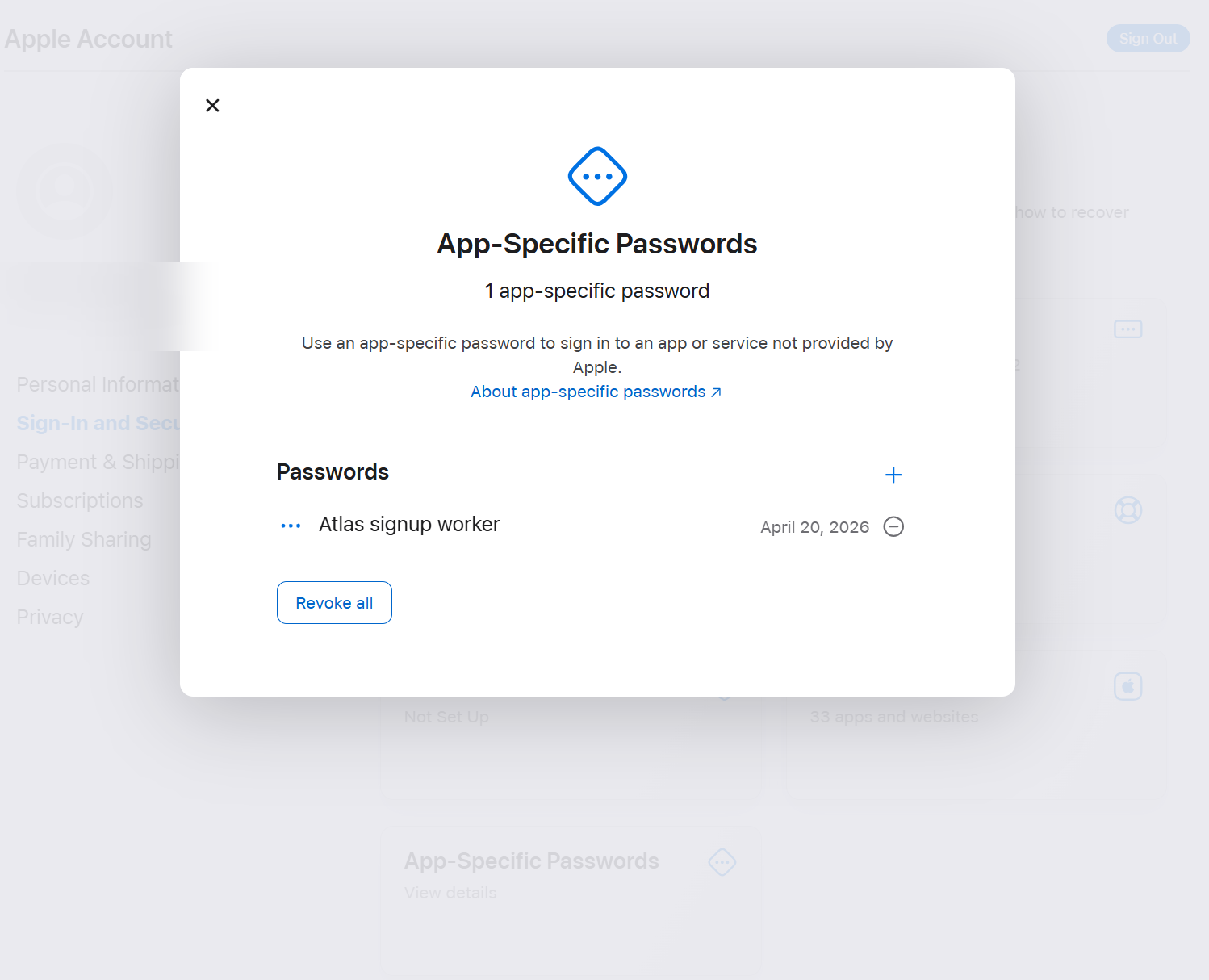
Atlas signup worker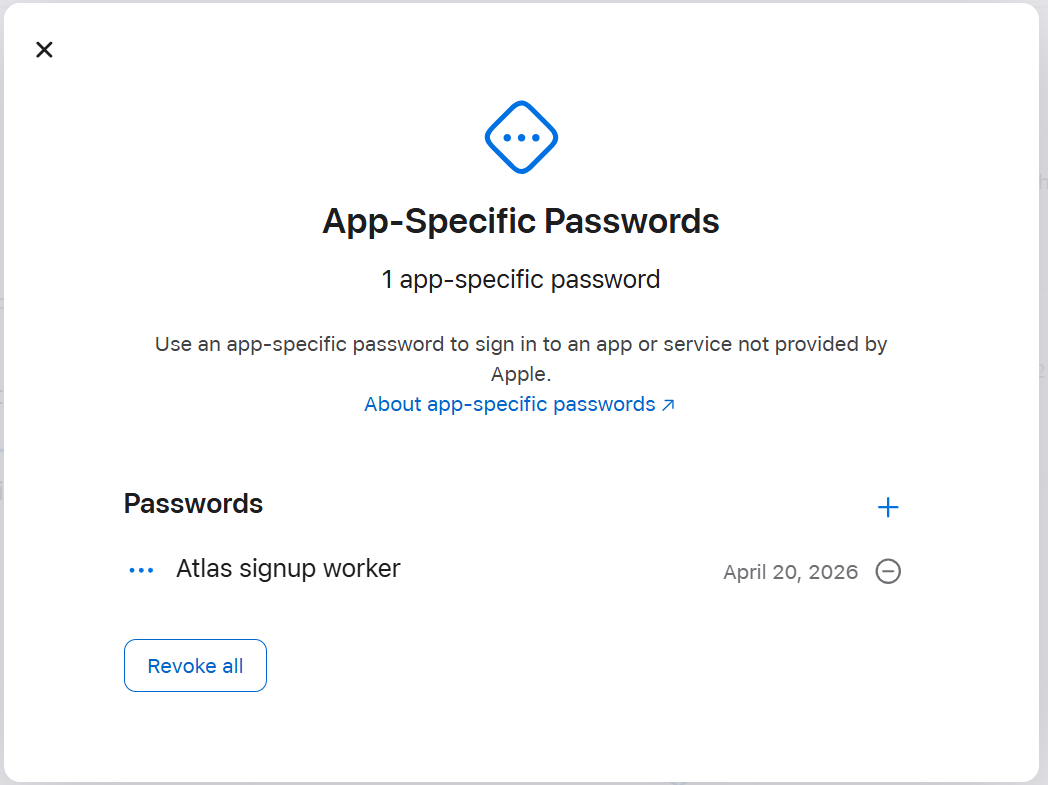
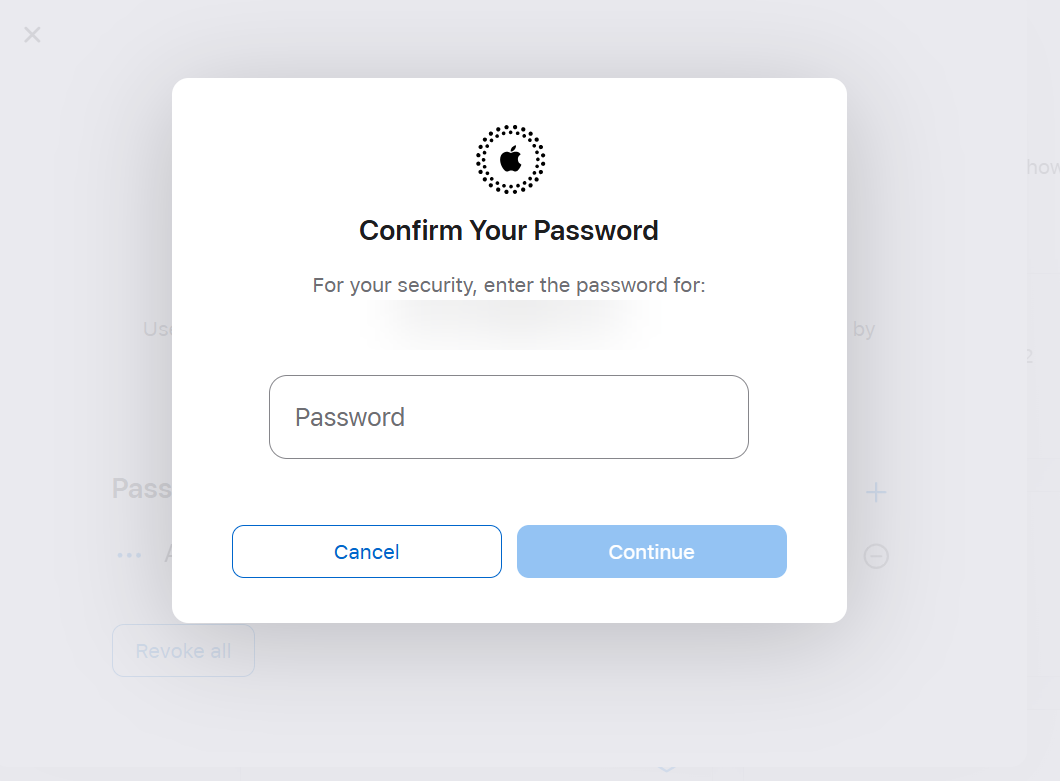
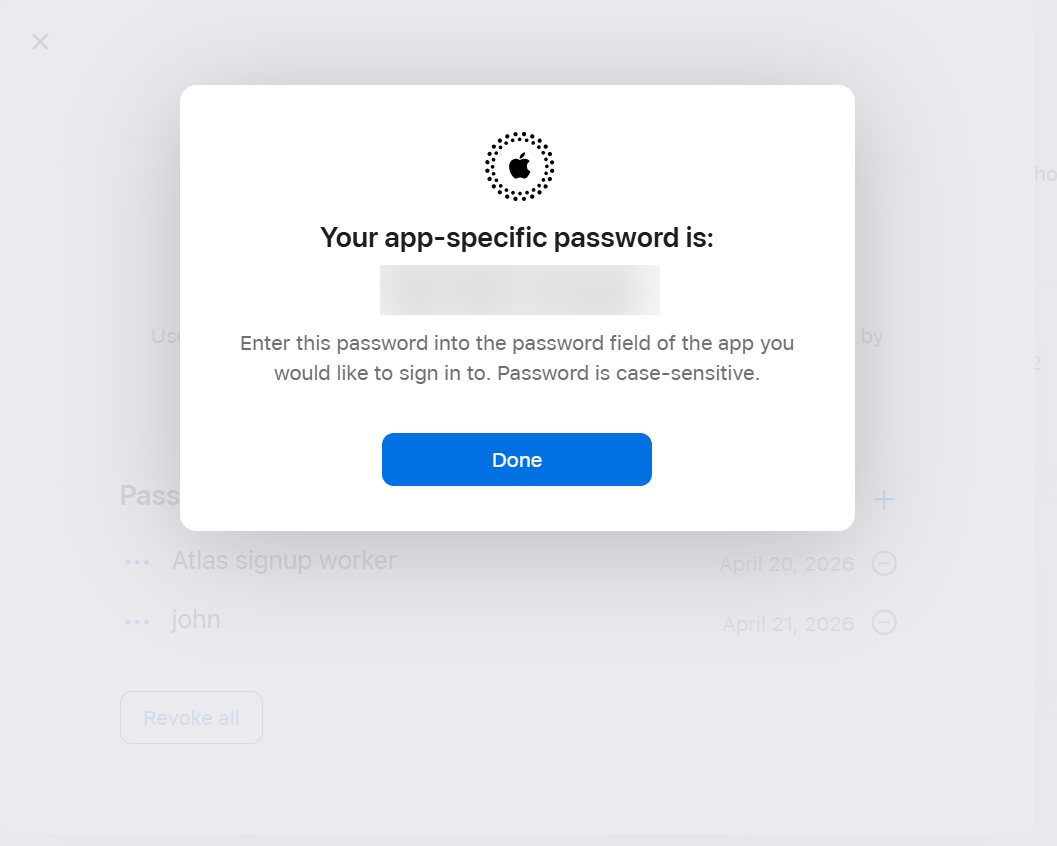
xxxx-xxxx-xxxx-xxxx. Copy it immediately - once you close this window, Apple will never show it again. If you lose it, you'll have to revoke and generate a new one.
xxxx-xxxx-xxxx-xxxx password on the right. Click Save & enable auto-verify - badge flips to Enabled and you're done.
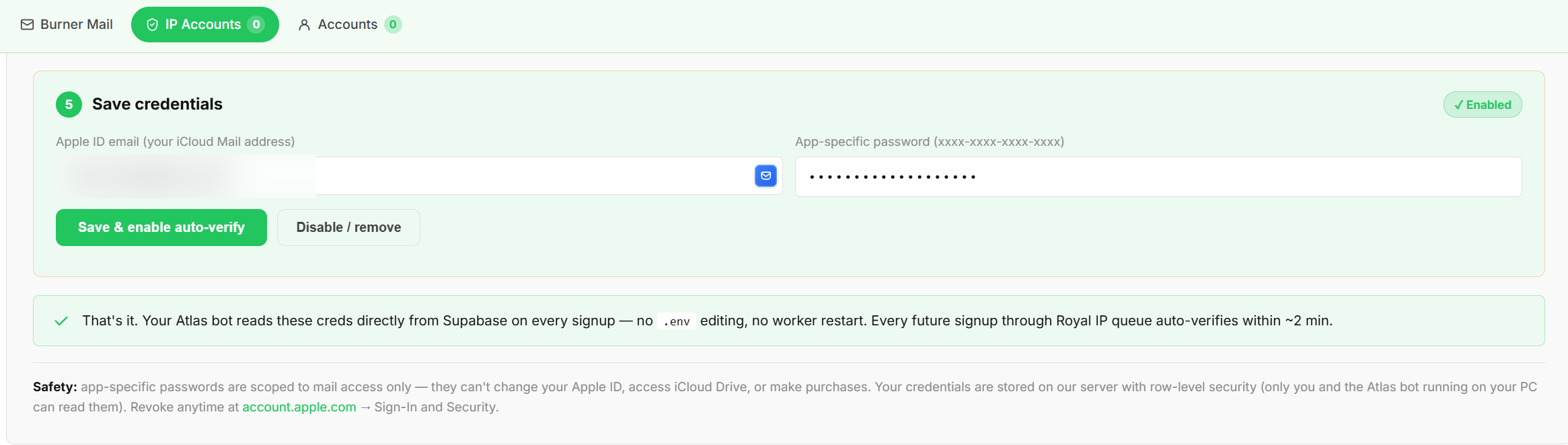
.env editing, no worker restart. Every future signup through Royal IP queue auto-verifies within ~2 min.
Buy at IPRoyal - Static Residential Proxies (~€1.80 / IP / month). Pick these settings:
| Setting | Value |
|---|---|
| Product | Static Residential (ISP) - not Rotating, not Datacenter |
| Location | The country you live in - it must match your real location. A foreign-country IP looks like an account takeover to chess.com and can flag the account. Keep the same country long-term. |
| Quantity | 1 IP to start - buy more once your first account is verified |
| Session | Sticky (same IP long-term, not rotating) |
| Plan | 30 days or longer |
After purchase, IPRoyal shows your credentials in a table:
Host           Port    Username        Password
192.0.2.10   12323   demo_user   demo_pass
Copy each cell into the matching field below - we'll assemble the URL for you. Add one row at a time when you bought more than one proxy.
Anti-ban tip: max 1-2 chess.com signups per IP per 24h. For more accounts, buy more IPs.
host:port:user:pass text.http://USER:PASS@HOST:PORT - takes priority over the four fields above when filled.Your license key and subscription details are waiting for you.
Subscribe to get your personal license key and start using Chesscheats.
Already subscribed? Make sure you're signed in with the same email.
Cancelling stops your subscription at the end of the current billing period. Your key stays active until then.
Keep this key private. It is linked to your account and subscription.
Link your Discord account so we can give you your plan role (Lifetime / Pro / Starter) and add you to the server automatically.
Get a personal referral link. Earn 30% on every first paid plan from your link. Payouts on request via SEPA, PayPal or BTC.
Need a payout? Email team@chesscheats.com with your IBAN/PayPal/BTC address. Min payout €25.
Under GDPR Art. 20 you have the right to a copy of every row we hold about you, in a machine-readable format.
Want your account deleted? Email privacy@chesscheats.com with the subject "Delete my data".
Enjoyed Chesscheats? Leave a review and get
+7 days added to your subscription
Review us on DiscordThis is exactly what you see after you install Atlas. Below it: live activity from across the network.
Atlas is a desktop app, so the bot runs on subscribers' own PCs. Users can opt in to share game data with the network. That feed is what you see above - real games, real outcomes, anonymized to the public name each owner picked.
Atlas finishes a rated game on chess.com on the user's PC. The result is logged locally.
If the bot is set to Public, the PGN + result + ratings are pushed to the shared pool - chess.com username is never sent.
Live feed refreshes every 20 seconds. Click any card to replay the game move by move.
Each bot plays its own openings at its own pace. A new account settles into a style over its first games; an established one stays consistent, so it never turns into a different player overnight.
The short version of what we've shipped, what we're working on, and what's next.
One developer, one weekend. The first version played a single game end-to-end. The rest of the year has been iteration on that idea.


The first build that felt finished. Engine quality, a real interface, and the basics needed for everyday use.
Layered safety net so the bot doesn't blow up an account on day one. The least visible work, and the most important.


From one bot to a fleet. Each account runs on its own residential identity so they don't look related.
Small fixes from the past week of customer use.

Rent a rig instead of running the bot on your own PC. EU datacenters, one residential IP per account. Beta waitlist is open.
More human-looking moves and an accuracy number that lines up with what chess.com shows after each game.

Closing the gap between "works" and "feels finished". Better onboarding, dashboards, and a real community around it.
Lowering the barrier so new players don't bounce on setup, and rewarding the ones who bring friends along.


A read-only version for players who want to study with the engine instead of letting it play for them.
Beyond chess.com and beyond Windows. More sites, more devices, more places where Atlas just works.


Open hosting signup once the beta is stable. More capacity, more regions, in-app rig controls.
The roadmap is shaped by paying users. Drop a request on Discord or send us a note - specifics are easier to share there.
The board, the best move and the evaluation appear right on screen while you play. Four ways to install, and one of them needs no computer at all.
You need iOS 15 or newer, a Chesscheats key, and Developer Mode turned on.


Stuck? Ask in our support channel.
You need Android 8 or newer, the chess.com app from the Play Store, and a Pro or Lifetime key.
The Android build shares no code with the iPhone build.
Free and it renews itself, so you set it up once and forget it. You need a computer for the first setup only.
An Apple ID, a Windows PC or Mac with a cable for the first setup, Developer Mode on, and a three-app limit on a free Apple ID.
On iOS 17 and up, SideStore can set itself up without the computer step. Skip the LiveContainer option.
No computer at all, but a paid signing service does the work. Worth knowing first: there is a yearly fee, you register your device, and Apple can revoke it. These services are not us and we earn nothing from them.
Turn on Developer Mode before the signed app will open.
Free and quick, from your computer with a cable. The downside is you re-sign it about once a week.
A Windows PC or Mac, a cable, an Apple ID (with an app-specific password if two-factor is on), and Developer Mode. On Windows you also need iTunes and iCloud from Apple's site, not the Microsoft Store.
The signature lasts about seven days. Run the steps again, or switch to SideStore so it renews itself.
The cleanest if your phone is already jailbroken: no re-signing, ever. Add our source once and install from it.
Support covers the tweak, not the jailbreak. We only advise against jailbreaking for this - it is your choice.
Some sites re-sign the app under a different name. We do not back those, for two reasons: we cannot verify a build we did not sign, and a changed app id stands out to chess.com. Use SideStore, Sideloadly, or our source, or ask us in the support channel.
One .apk, no root and no computer. You set it up once. After that the Atlas button sits inside the chess.com app.
Android 8 or newer, the chess.com app from the Play Store (logged in), and a Pro or Lifetime key.
On Android 13 and newer the Board access switch can stay grey with "Restricted setting". Open Settings · Apps · Atlas, tap the three dots at the top right, choose Allow restricted settings, and turn Board access on again.
Everything you know from the desktop version, on the screen you actually play on. Unlocked with the key you already have.
The Chesscheats app, unlocked with the key you already have.
Board, best move and direction right on screen, and it can play the move for you.
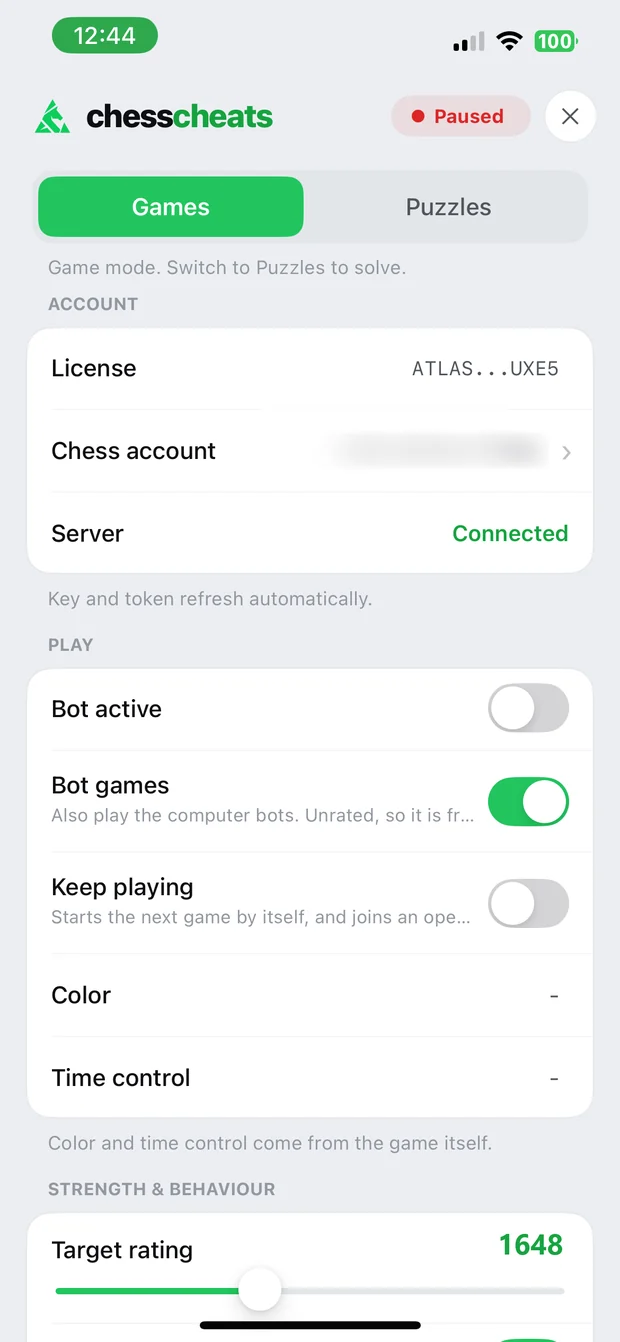
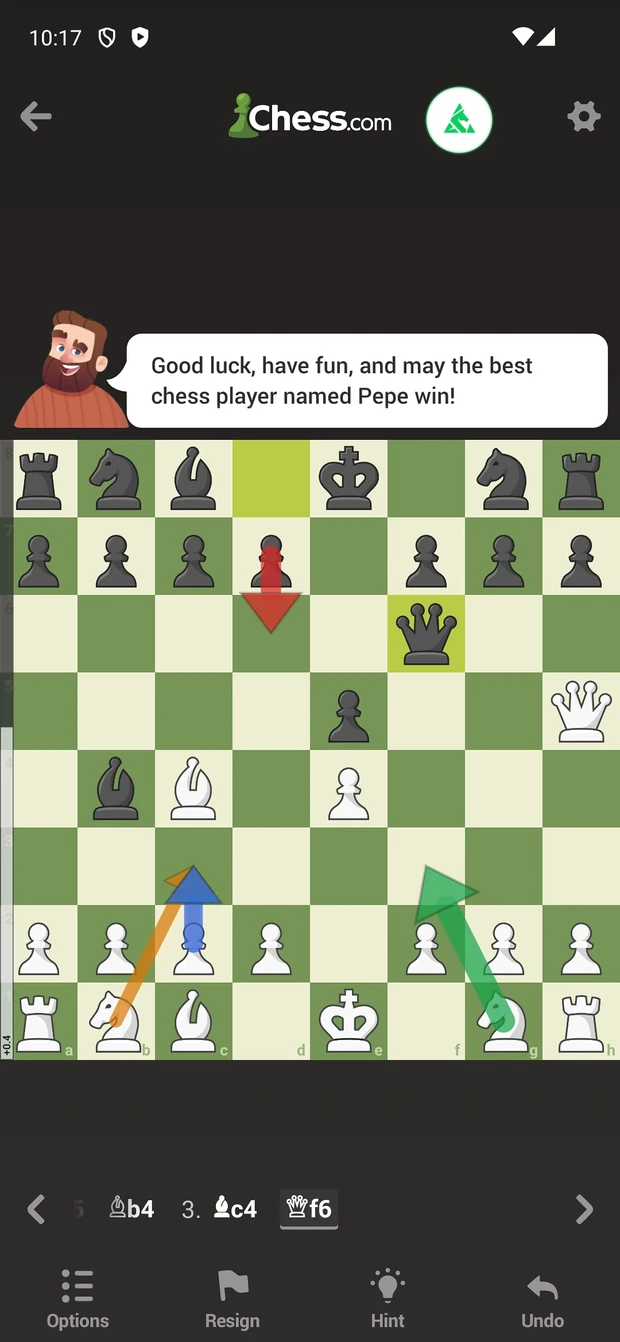
Every feature draws straight onto the chess.com board, and every one of them has its own switch.

The green arrow is the strongest move. Numbered amber arrows are solid alternatives, and the blue arrow is the move a player at your rating would choose. You set that rating yourself with one slider.
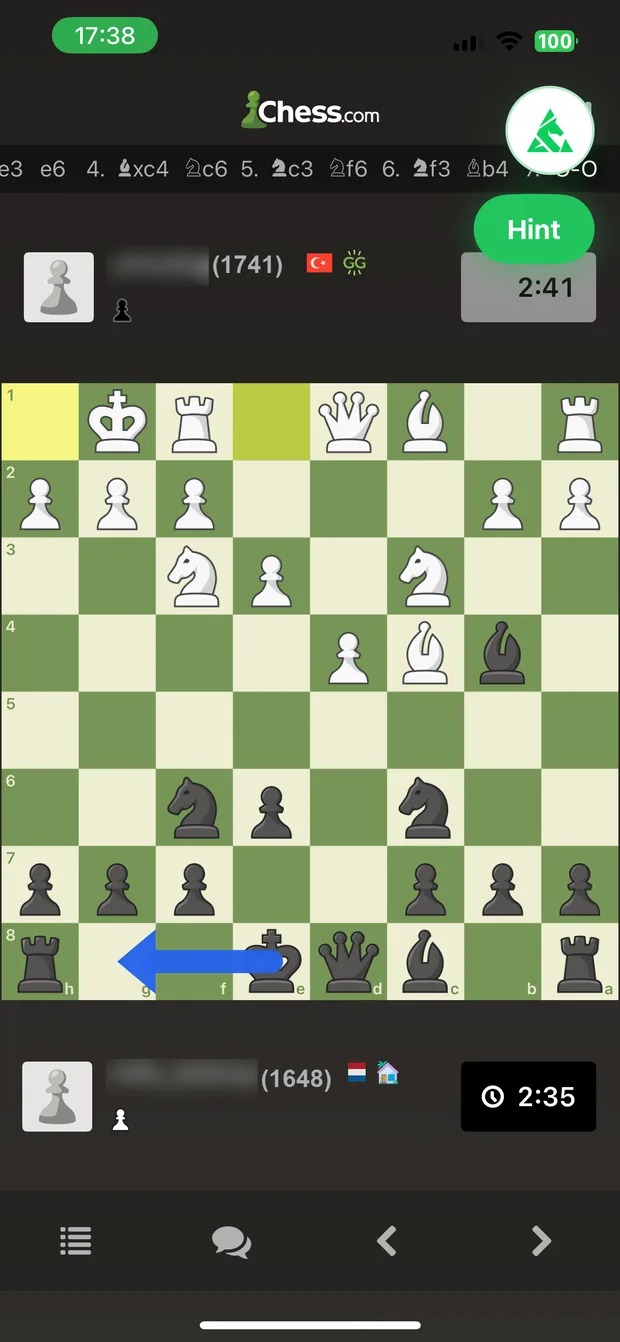
Want to think for yourself? Hint mode clears the board. When you are stuck, tap Hint and a single blue arrow shows the move a player at your level would make.
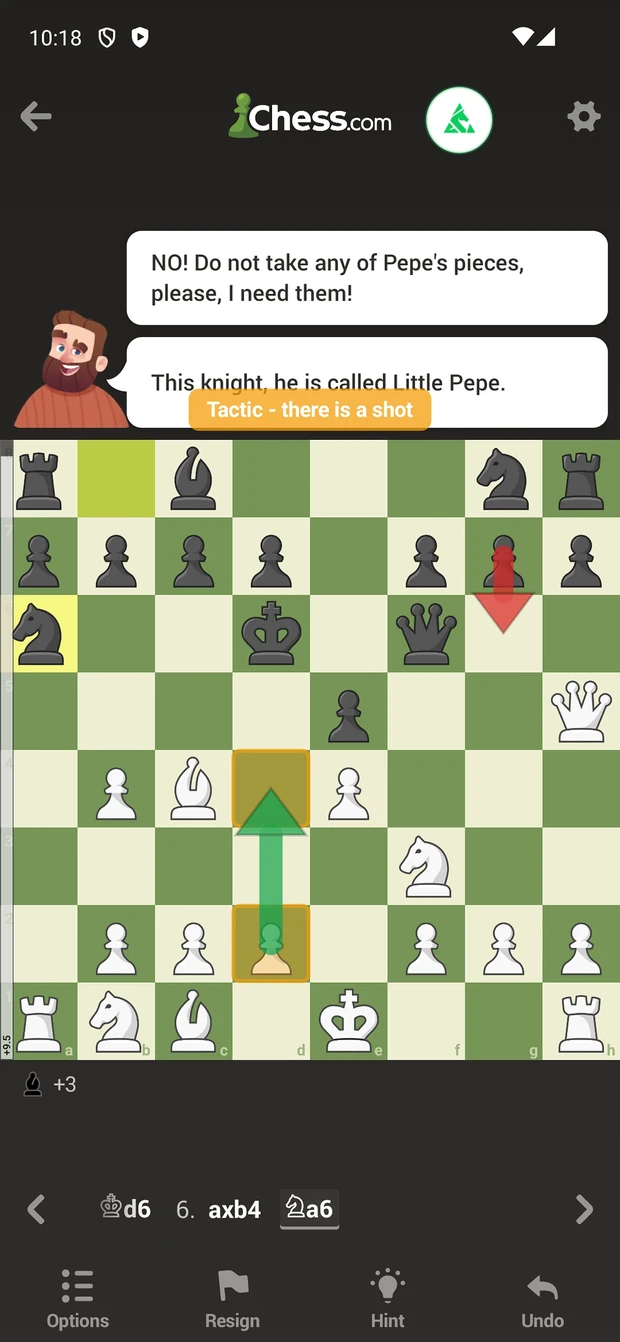
When one move clearly wins, the key squares light up and a Tactic label appears, so a free piece never slips past you. A red arrow shows what your opponent is aiming at.
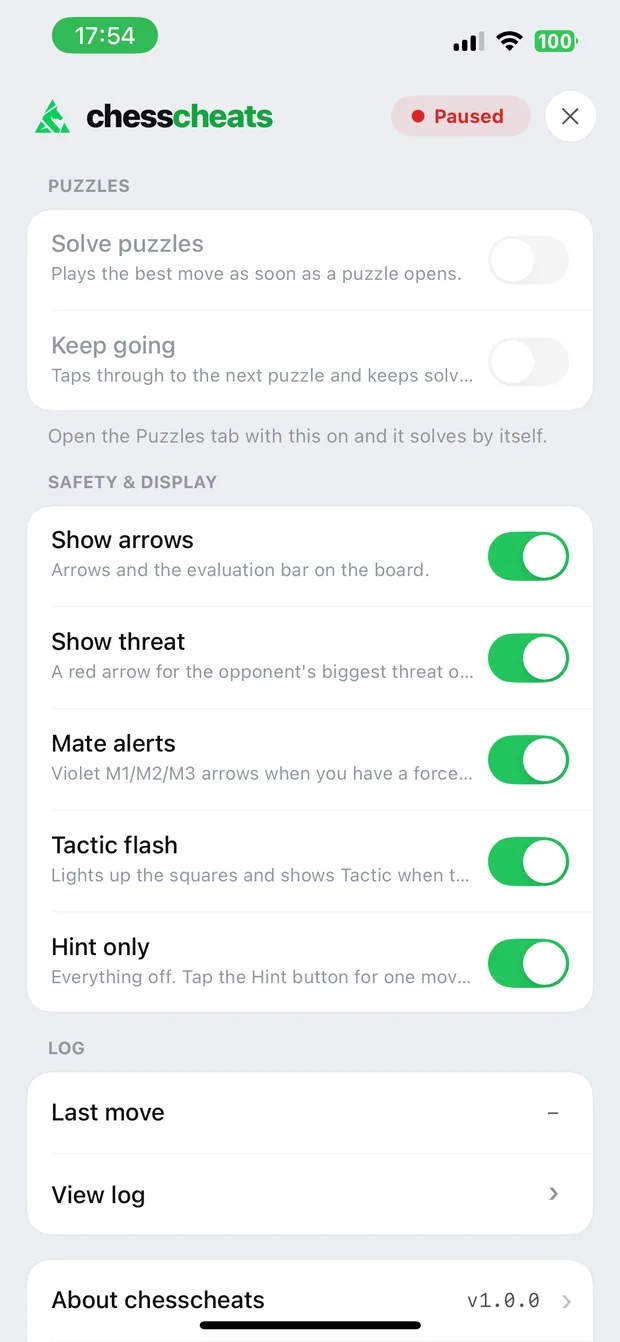
Arrows, threats, mate alerts, tactic flash and hint mode each have their own switch in the menu. Turn on what helps you and leave the rest off.
When a forced mate is on the board you see the move to play and how many moves it takes. If your own king can be mated, a warning shows up in time to defend.
A slim bar next to the board shows who is better at a glance.
Solve every position right in the app, keep your streak alive and climb the puzzle path.
Rather sit back? Atlas can play the moves for you, at the strength you set.
One slider sets the rating the blue arrow plays at, so the advice fits the way you play.
The same key you use on Windows. One key covers one PC and one phone at the same time.
Put it on your iPhone with Sideloadly, SideStore or ESign, and turn on Developer Mode once.
Open the app, enter your key once and play on chess.com as usual.
 Sideloadly
 SideStore
 ESign
You need iOS 15 or newer, a Chesscheats key and Developer Mode turned on. No jailbreak needed. Full install guide
No. You install the app with a sideloader such as Sideloadly, SideStore or ESign. Developer Mode has to be on, that is all.
Yes. One key covers one PC and one phone at the same time, so you can run both.
Yes. It runs on iPhone and iPad with iOS 15 or newer.
A free Apple ID signs an app for seven days. SideStore can renew it for you in the background. With a paid Apple developer account an install lasts a year.
No. It comes with Pro and Lifetime and uses the same key you already have.
Download the app, enter your key and play on the screen you actually play on.
Work through the puzzle path, keep your streak alive, and solve every position right inside the app.
Follow the path from one puzzle to the next, level by level.
Build a daily streak and watch your puzzle rating climb.
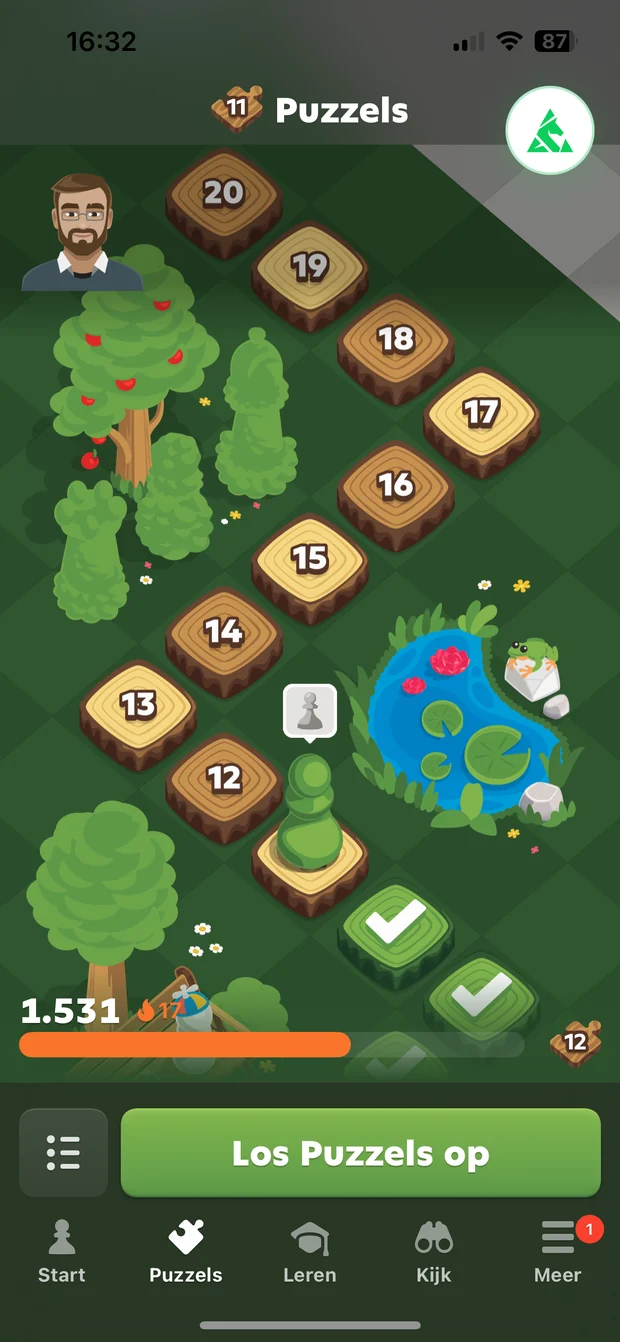
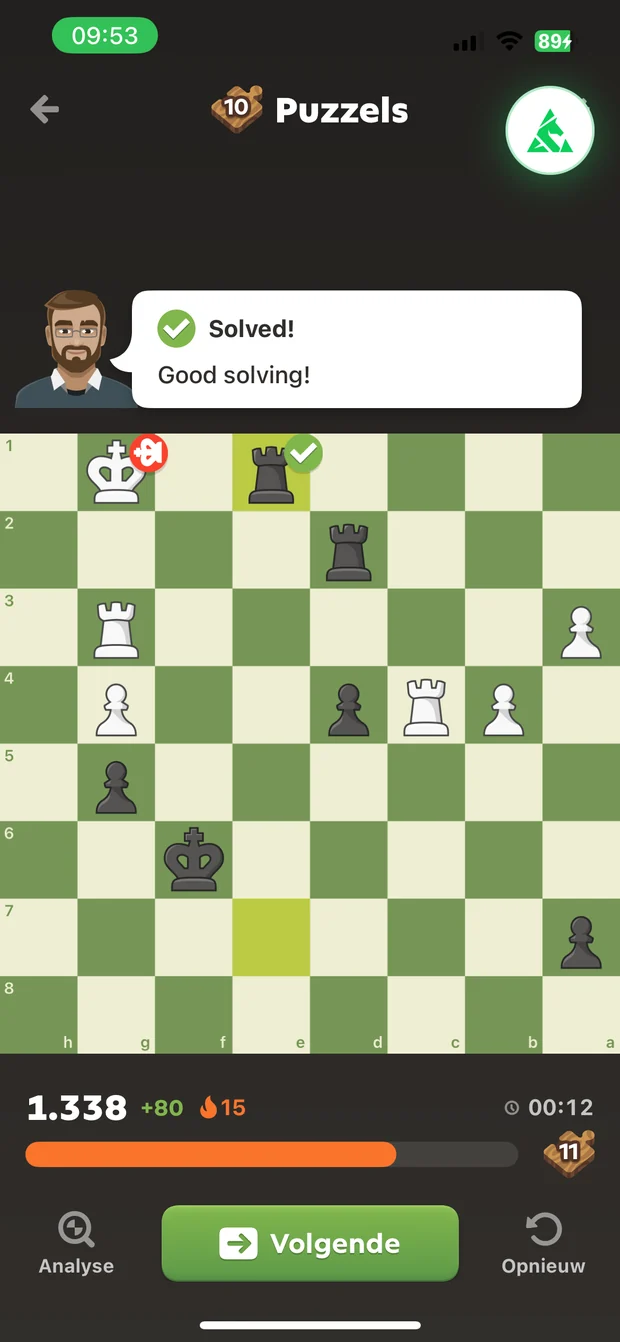
Climb from one level to the next on a path that keeps you going.
Keep the fire going. Come back every day and your streak grows.
Solve a position and you see it right away, then move to the next one.
Everything you know from the desktop version, on the screen you actually play on. Unlocked with the key you already have.
The Chesscheats app, unlocked with the key you already have.
Board, best move and direction right on screen, and it can play the move for you.
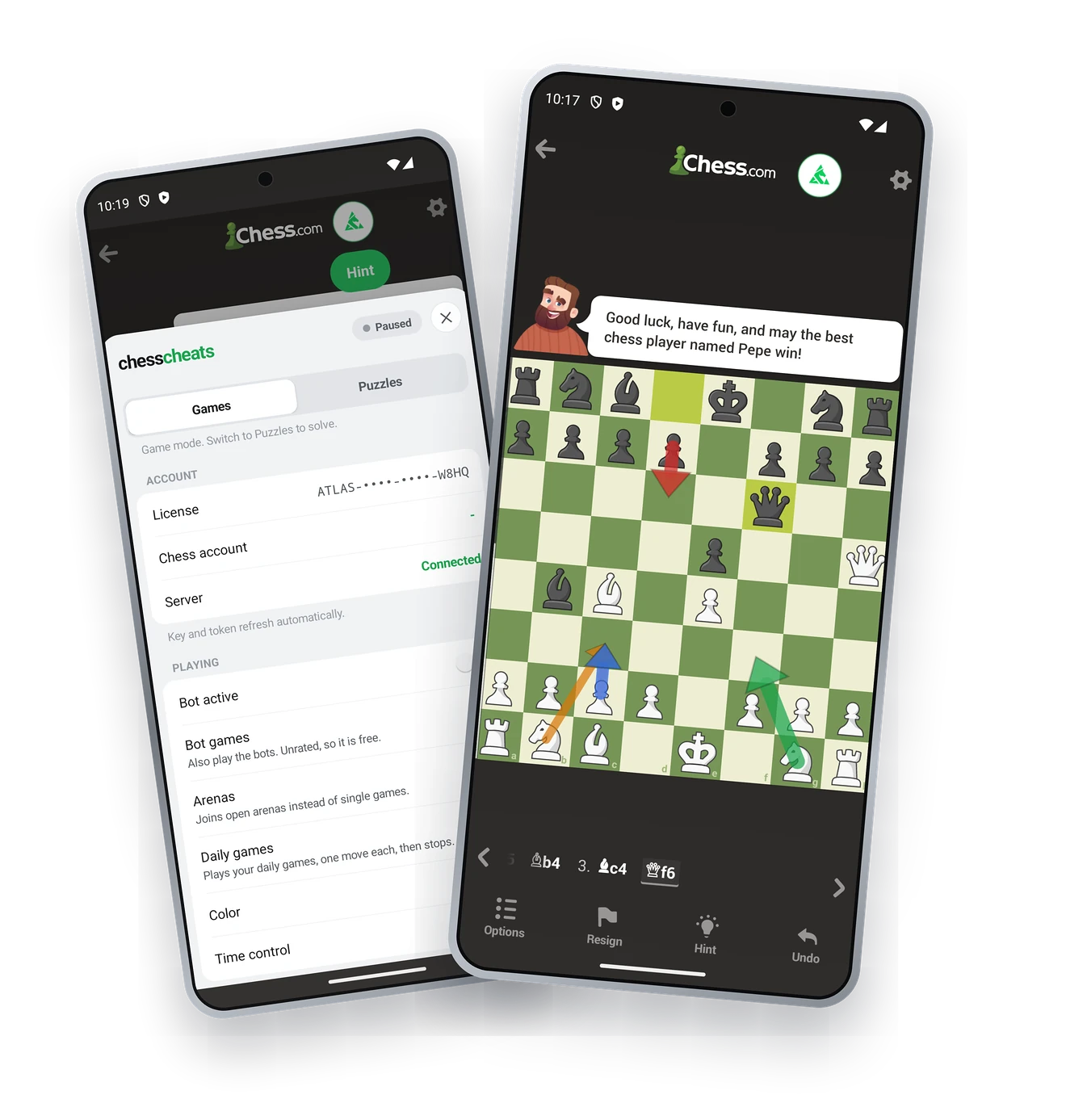
Every feature draws straight onto the chess.com board, and every one of them has its own switch.
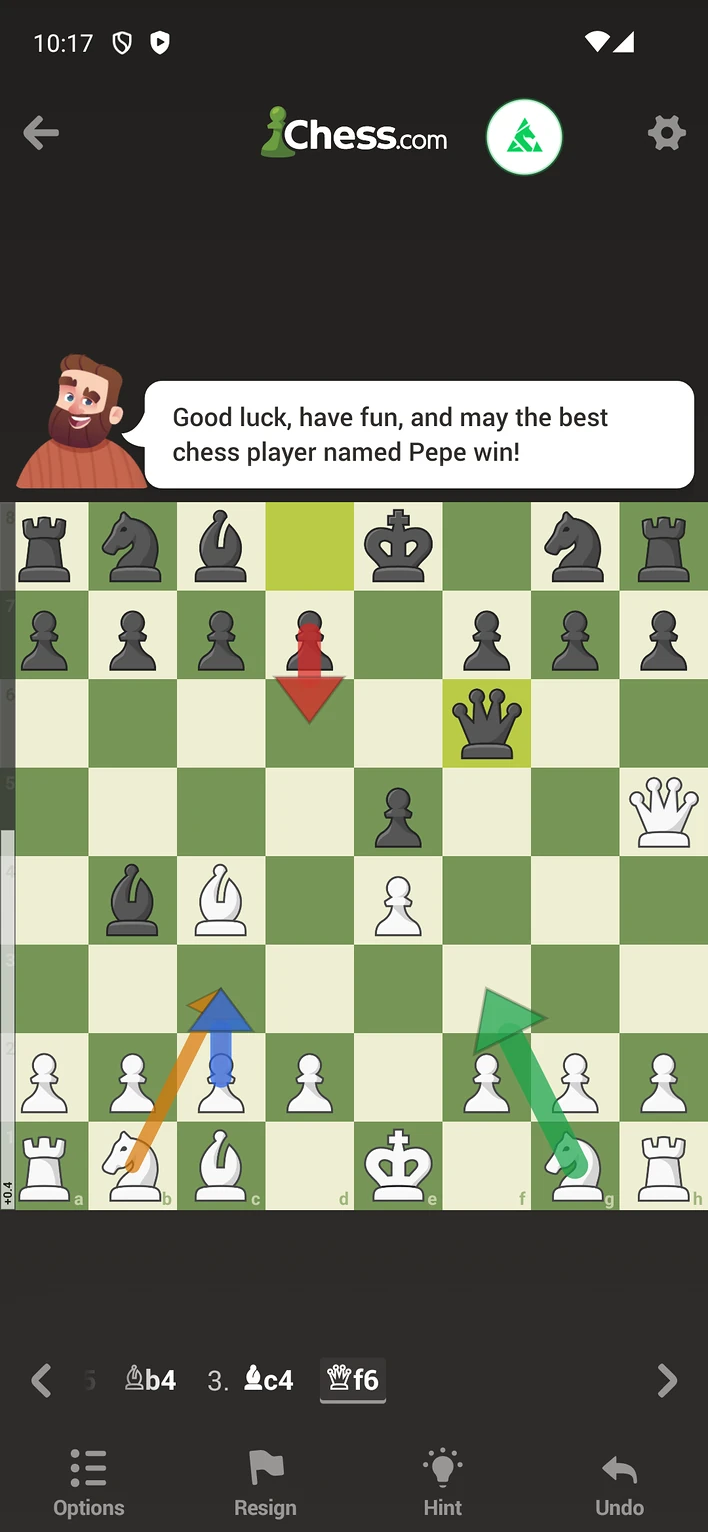
The green arrow is the strongest move. Amber arrows are solid alternatives, and the blue arrow is the move a player at your rating would choose. A red arrow shows what your opponent is aiming at.
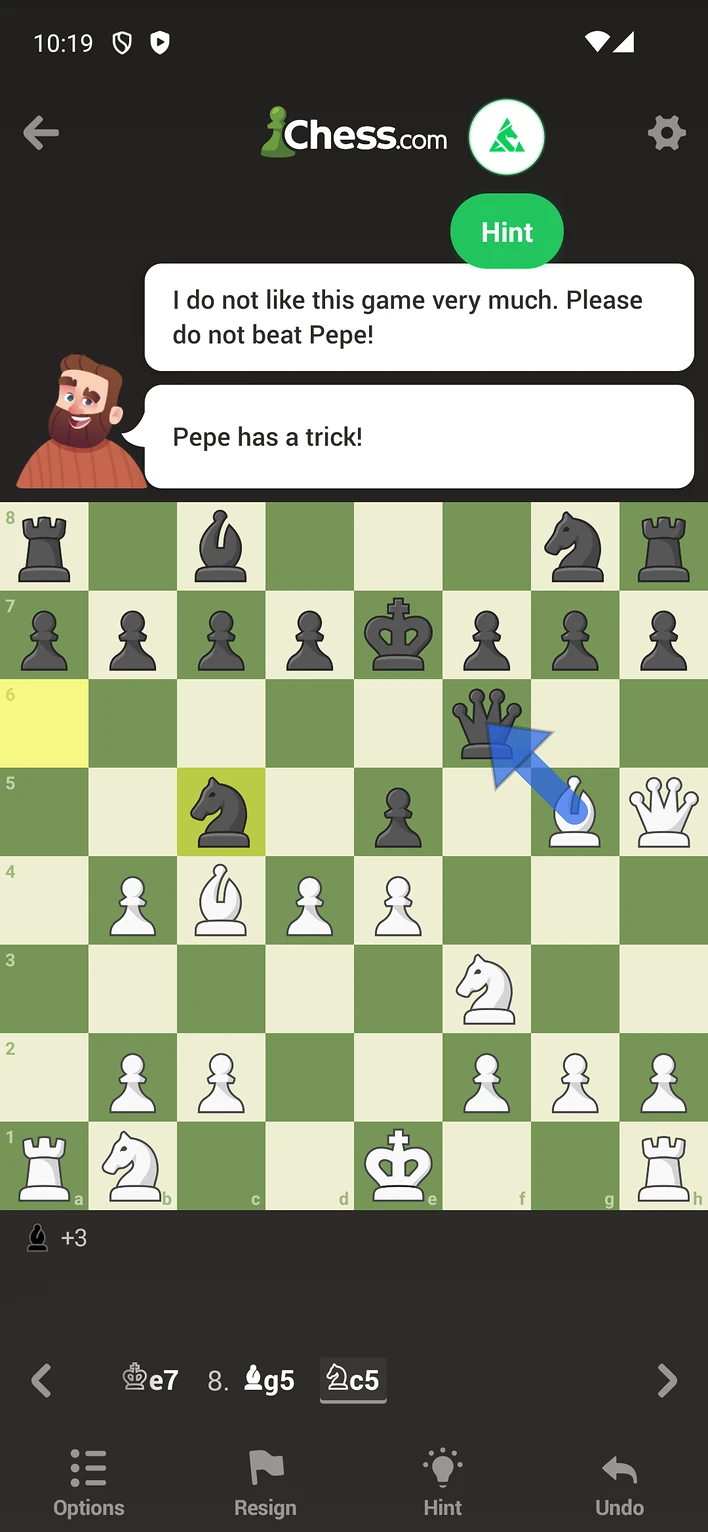
Want to think for yourself? Hint mode clears the board. When you are stuck, tap Hint and a single blue arrow shows the move a player at your level would make.
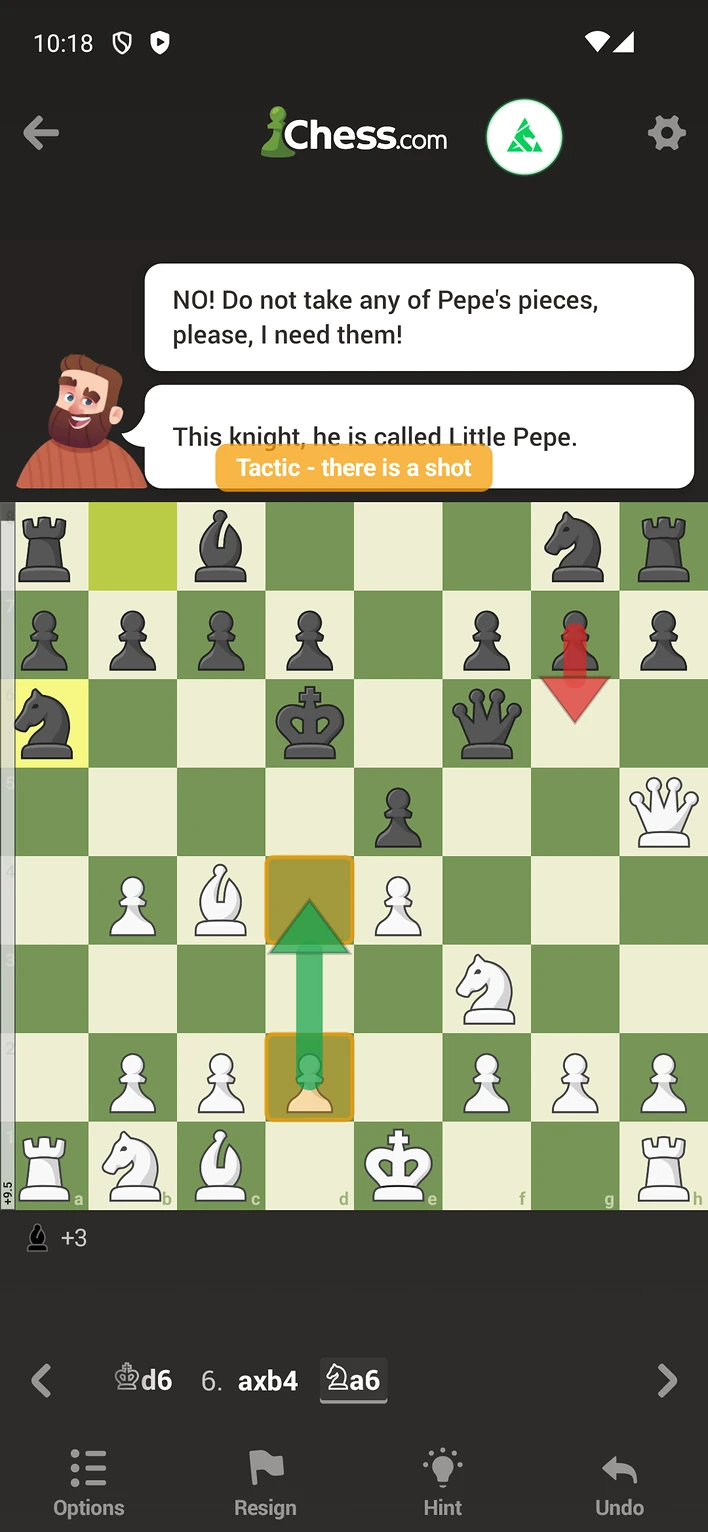
When one move clearly wins, the key squares light up and a Tactic label appears, so a free piece never slips past you. A red arrow shows what your opponent is aiming at.
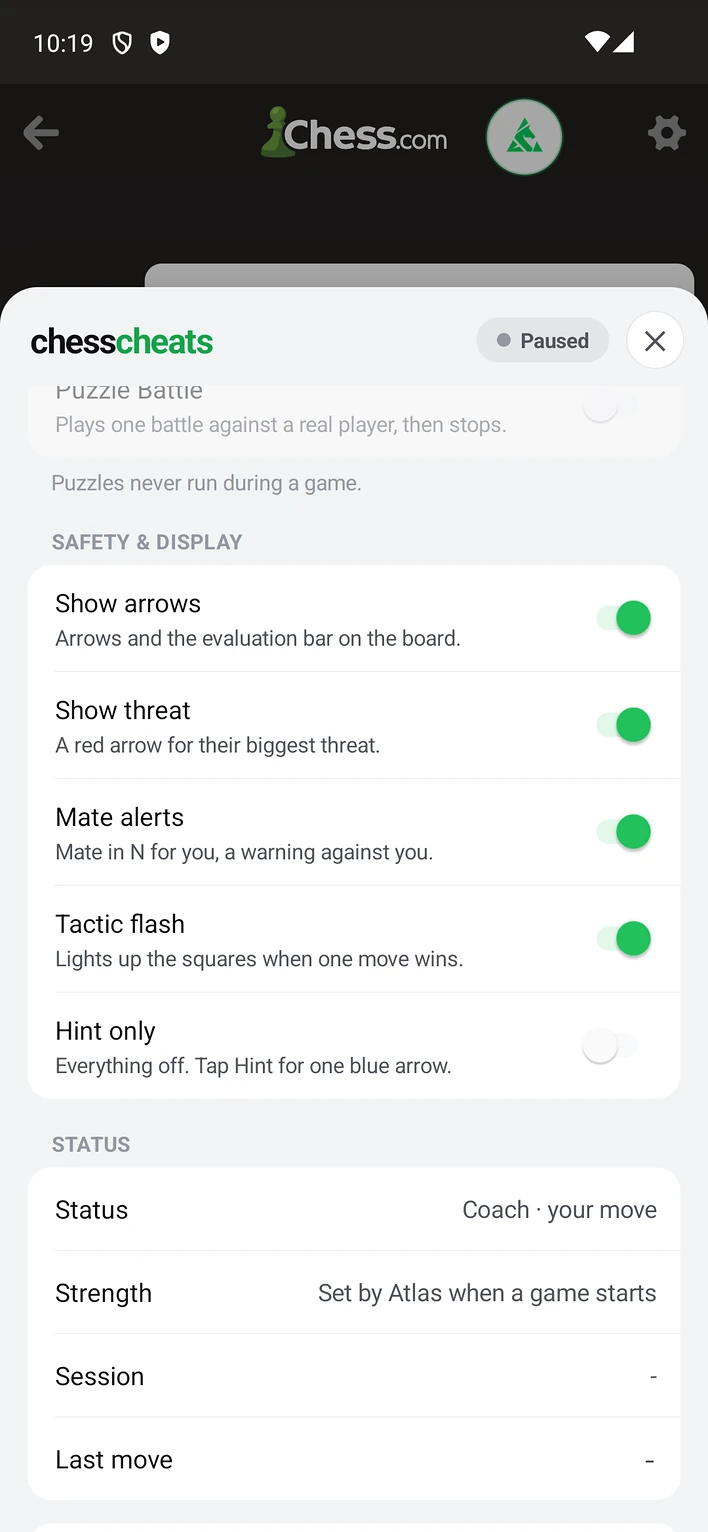
Arrows, threats, mate alerts, tactic flash and hint mode each have their own switch in the menu. Turn on what helps you and leave the rest off.
When a forced mate is on the board you see the move to play and how many moves it takes. If your own king can be mated, a warning shows up in time to defend.
A slim bar next to the board shows who is better at a glance.
Puzzles, Puzzle Rush and Puzzle Battle, right inside the chess.com app. Keep your streak alive.
Rather sit back? Atlas can play the moves for you, against people and bots.
Atlas can also play your daily games, one move each time, and join open arenas for you.
The same key you use on Windows. One key covers one PC and one phone at the same time.
Open the file on your phone and let your browser install apps once. No computer needed.
Open Atlas, enter your key, allow two things and play on chess.com as usual.
You need Android 8 or newer, the chess.com app from the Play Store and a Pro or Lifetime key. No root needed. Full install guide
No. Atlas is one .apk that you install yourself. It needs two permissions, the Atlas button and Board access, and that is all.
Yes. One key covers one PC and one phone at the same time, so you can run both.
That warning shows for any app installed from a file.
On Android 13 and newer it can say "Restricted setting". Open Settings, Apps, Atlas, tap the three dots, choose Allow restricted settings and switch it on again.
No. It comes with Pro and Lifetime and uses the same key you already have.
Download the app, enter your key and play on the screen you actually play on.
Choose how you'd like to pay.
No signup needed. We'll email your license + a one-click sign-in link to your dashboard.
Card checkout is temporarily unavailable. Complete your purchase on our G2G storefront:
Buy on G2G
View storefront
By continuing you agree to our Terms. Digital services - the EU 14-day right of withdrawal is waived once your proxy + account are provisioned.
Pick how you would like to pay.
Buy the Pro offer there. G2G gives you your license key right after payment. Then activate it here.
No key from G2G? Send us your order ID and we deliver it.
Buy the offer on G2G, then submit your G2G order ID below to confirm.
We verify your payment, then email your key, usually within minutes. You can close this window after submitting. 7-day refund if Atlas will not run on your PC.
We've logged your G2G order . Once we verify the payment, your license key is emailed to , usually within minutes.
See your dashboard and your license key.
We'd hate to lose you. Pick what fits - applied immediately, no support ticket needed.
This is how you'll appear in reviews and on the Live feed. Your chess.com username stays private.
_ and -

Live support, daily tips, anti-ban updates and direct access to the team. Free to join · no spam.
Ask a question or report a problem. We reply within one business day.
We'll reply to the email you provided within one business day. Urgent? Hop into Discord.
